
HR & Payroll Software for Indonesian Companies: What It Must Cover
Effective-rate income tax, BPJS wage ceilings, statutory leave, prorated religious bonus, and payroll journals. A checklist for choosing HR software Indonesian HR teams actually keep using.
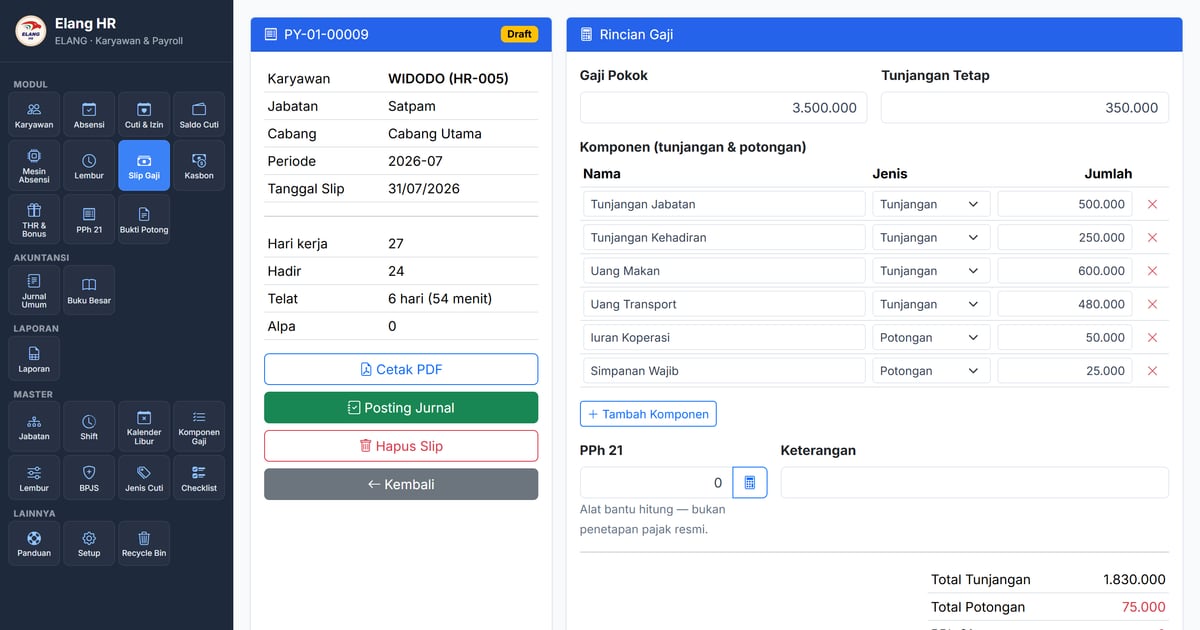
At the end of every month the same scene repeats in thousands of offices: the HR officer opens three spreadsheets at once. One holds clock-in times copied from the attendance machine, one holds leave balances, one holds overtime scraped out of WhatsApp messages. Payslips are born from those three — typed one by one, then retyped by the accountant as journal entries.
The process can eat three to five working days, and every copy is a chance for a typo that only surfaces when an employee complains.
HR software is sold to end this. The problem is that plenty of it gets bought and still lives next to the spreadsheets — because some part of the job was left uncovered. This article is a checklist: what has to be there for HR software to genuinely replace those files, especially under Indonesian rules.
1. Attendance that understands shifts, not just clock-ins
Storing an arrival time is easy. Deciding what that time means is the hard part.
Someone taps in at 22:05 — are they late, or are they starting a night shift that ends tomorrow morning? A security guard on a three-shift rotation cannot be judged against office hours. Software worth paying for needs:
- schedule groups with one to many shifts, including shifts that cross midnight;
- lateness tolerance as a setting, not a hardcoded number;
- a public-holiday calendar, including joint leave days and company-specific closures;
- a monthly recap that separates present, late, permitted absence, sick, leave, holiday and unexcused absence, plus a “no clock-out” flag.
Without a correct recap, every payroll calculation built on top of it is wrong too.
2. Leave with balances, not free-text notes
This is the number-one reason companies buy HR software — and the part most often left half-finished. Recording “on leave the 5th” is not a leave module. What you need:
- an automatic annual quota (the statutory reference is 12 working days after 12 months of service), prorated for staff who have not completed a year;
- carry-over of unused days into the next year, with a cap and an expiry date;
- requests by date range that automatically skip public holidays and weekly rest days;
- leave types you define yourself: paid or unpaid, deducting the quota or not, requiring an attachment or not (maternity leave, for instance, counts calendar days rather than working days);
- approvals with status, a required rejection reason, and a record of who approved when.
One small detail is frequently missed: paid leave must not wipe out daily allowances. If the meal allowance is computed from days present, an employee on approved leave loses it — and HR is back to correcting payslips by hand.
3. Overtime that follows the regulation, not a verbal deal
Overtime pay in Indonesia follows the manpower regulation: on a working day the first hour is worth 1.5× the hourly wage and each following hour 2×, while public holidays use a different structure entirely. A company on a five-day week does not compute it the same way as one on a six-day week.
Good software keeps those multipliers as data you can open and adjust, not as a formula buried in code. And once a request is approved, its value should be locked — so a policy change next month does not quietly rewrite overtime that was already paid.
4. Payslips that compute BPJS and income tax themselves
This is where cheaper HR tools stop, and the spreadsheets come back out.
BPJS is not one number. There are five programmes, each with an employer share and an employee share, and each with its own wage ceiling. The pension-programme ceiling changes almost every year, and the accident-insurance percentage follows your company’s risk class. So the rates have to be data you can update, not numbers tied to an application version.
Income tax (PPh 21) has, since the 2023 regulation, used average effective monthly rates: the rate category comes from the employee’s tax status, applied to gross monthly income — then December recalculates the whole year against the progressive brackets. Software worth having does both, not just the monthly half.
Beyond that, a payslip has to survive everyday reality:
- proration for staff joining or leaving mid-month;
- daily components (meal, transport) multiplied by days present, kept separate from monthly ones;
- late fines, absence deductions, unpaid-leave deductions following your own policy;
- staff loan instalments that deduct automatically until settled;
- religious bonus and bonuses as their own payslip, taxed as irregular income — not stacked onto the monthly slip.
5. Annual withholding slips that aren’t made by hand
Early the following year every employee is entitled to a withholding slip (form 1721-A1). If a year of payslips is already stored properly, that document should be assembled automatically and issued in bulk — not retyped one by one from a summary.
6. The finish line: bookkeeping, not an export file
This is the difference least noticed at purchase and most felt in use.
Most HRIS products stop at “export journal” — a CSV you then import into separate accounting software, where it usually fails because the account names do not match. Your accountant still does the work twice.
What should happen instead: a posted payslip creates the journal entries directly in the ledger — payroll expense, income-tax payable, BPJS expense and payable — as a draft, and accounting simply reviews and posts it. One number, one source, no copying.
What you probably shouldn’t pay for
HRIS feature lists get long, and not all of it helps a company with dozens to a few hundred staff. Recruitment (ATS), e-learning, 360-degree performance reviews and succession planning are usually expensive, rarely used, and abandoned after three months. That budget does more good making attendance, leave, payroll and bookkeeping genuinely clean.
On price: per employee, or fixed?
Nearly every subscription HRIS charges per employee per month. The number looks small at first — until you have 150 staff across five branches and HR software becomes one of your larger recurring costs. Ironically it is exactly the labour-heavy businesses, retail and F&B, that need this software most and are punished hardest by that model.
The alternative is software running on the company’s own server with a fixed monthly fee: headcount can grow without the invoice moving.
Elang Human Resource
Elang Human Resource was built against the checklist above: real-time face-machine attendance, shifts and monthly recaps, leave with balances and approvals, overtime with data-driven multipliers, staff loans with instalments, payslips with BPJS and effective-rate income tax, bonuses, annual 1721-A1 slips, seven Excel-ready reports — and payroll journals that land directly in the ledger of the same application.
We set it up and maintain it on your own server (VPS), for a fixed monthly fee (server rental + maintenance). Your HR data is yours and can be exported anytime. The tax and contribution calculations inside are a time-saving aid — their reference figures are open to inspect and adjust, because the final filing remains the company’s responsibility.
Closing
Good HR software isn’t measured by how many menus it has, but by how many spreadsheets you can finally close. If HR still keeps its own leave-balance file after the purchase, you bought half a system.
Read next: the employee self-service portal that gets leave requests out of the WhatsApp group and from the attendance machine to the payslip without retyping. Or go straight to Elang Human Resource and request a free demo.