 Elang Human Resource
 Attendance, leave, and payroll connected, with no retyping in Excel.
Elang Human Resource (Elang HR) is HR and payroll software that connects the face tap at the attendance machine to the payroll journal in your books. Shifts and attendance recaps, leave and overtime with approvals, staff loans, payslips with BPJS and PPh 21, THR (religious holiday allowance), and annual tax slips are all in one place. Employees handle their own requests from their phones. We set it up and maintain it on your own server; the data is yours and can be exported at any time.

The same numbers, typed three times
In many companies, arrival times are copied from the machine into Excel, leave balances are kept in a separate file, and everything is retyped when payslips are made, then once more when the accountant prepares the journal. Every copy is a chance for a typo that only comes to light when an employee complains. In Elang HR, one face tap is enough. The data flows on its own all the way to the General Ledger.
Once payslips are booked, journal entries appear in the General Ledger: payroll expense, PPh 21 payable, and BPJS contributions. Your accountant only reviews them, with no retyping from an export file or Excel.
PTKP (non-taxable income thresholds), tax brackets, TER, BPJS rates, and overtime multipliers can be viewed and updated, instead of being fixed numbers inside the code. When the rules change, you only adjust the numbers.
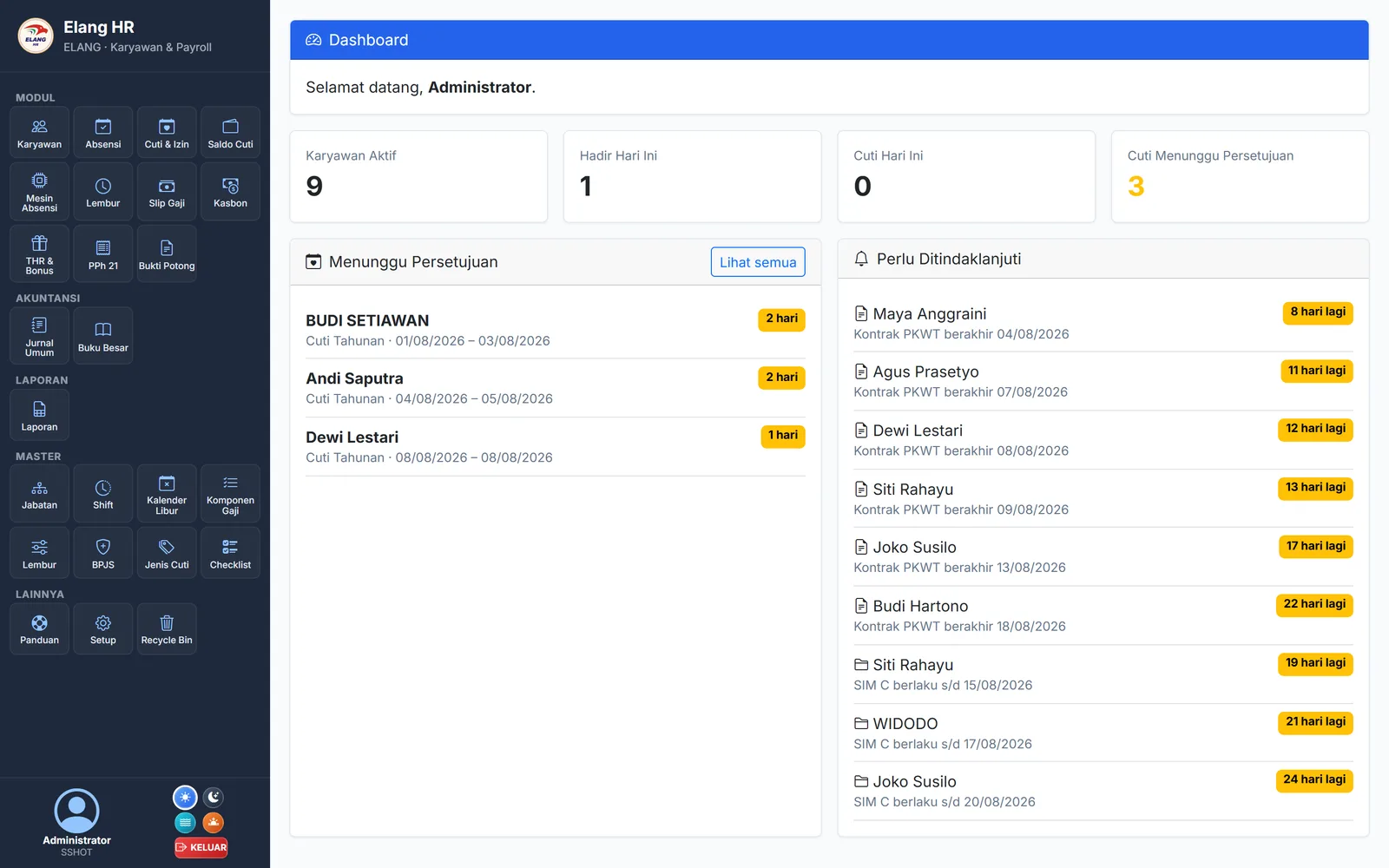
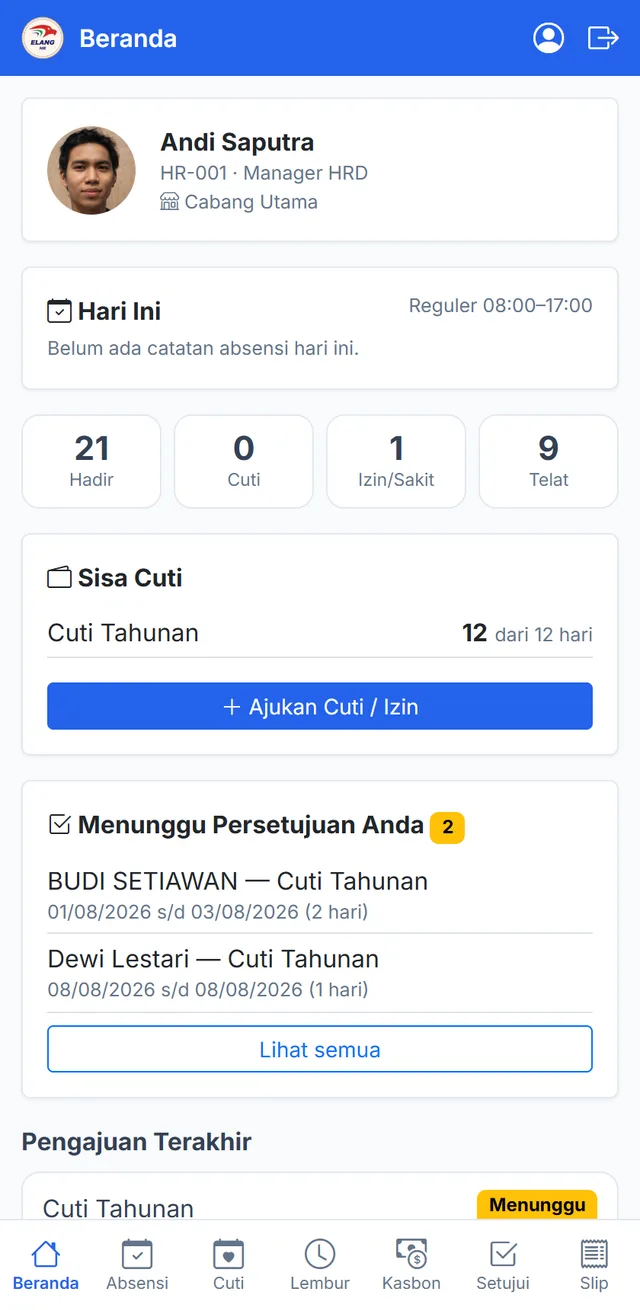
Employees submit leave, overtime, and loan requests from their phones, and supervisors approve them from their phones too. HR no longer retypes requests one by one.
Four stages that are usually retyped, connected automatically here
Good HR software isn’t measured by how many menus it has, but by how much manual work disappears. In Elang HR, data is recorded once at the attendance machine, then flows into recaps, requests, payslips, and the books without being copied through Excel.
Attendance
- Employee taps their face at the machine
- Matched to the shift schedule
- Lateness and absence counted
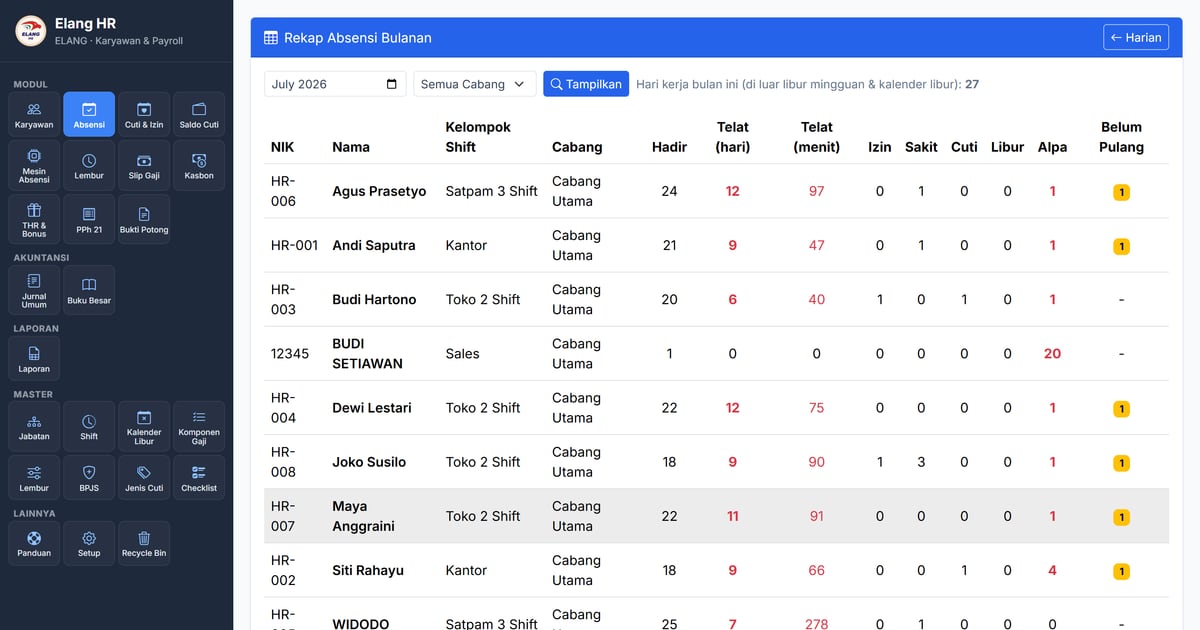
- Monthly recap ready
Overnight shifts and the lateness tolerance set by your policy are taken into account.
Requests
- Employee submits from their phone
- Supervisor / HR approves
- Balance and attendance update
- The amount is locked
Approved leave is recorded in attendance right away. If it is cancelled, the balance is restored.
Payroll
- Create payslips for one period
- BPJS and PPh 21 calculated automatically
- Correct while still a draft
- Print the PDF
Overtime, loan instalments, late fines, and proration for employees who join or leave mid-month are already included.
Bookkeeping
- Payslips are booked
- A draft journal is created
- The accountant reviews it
- Recorded in the General Ledger
Journals use the account codes your company sets, so entries go to the right accounts.
Complete HRIS features, connected directly to your books
Employee Records
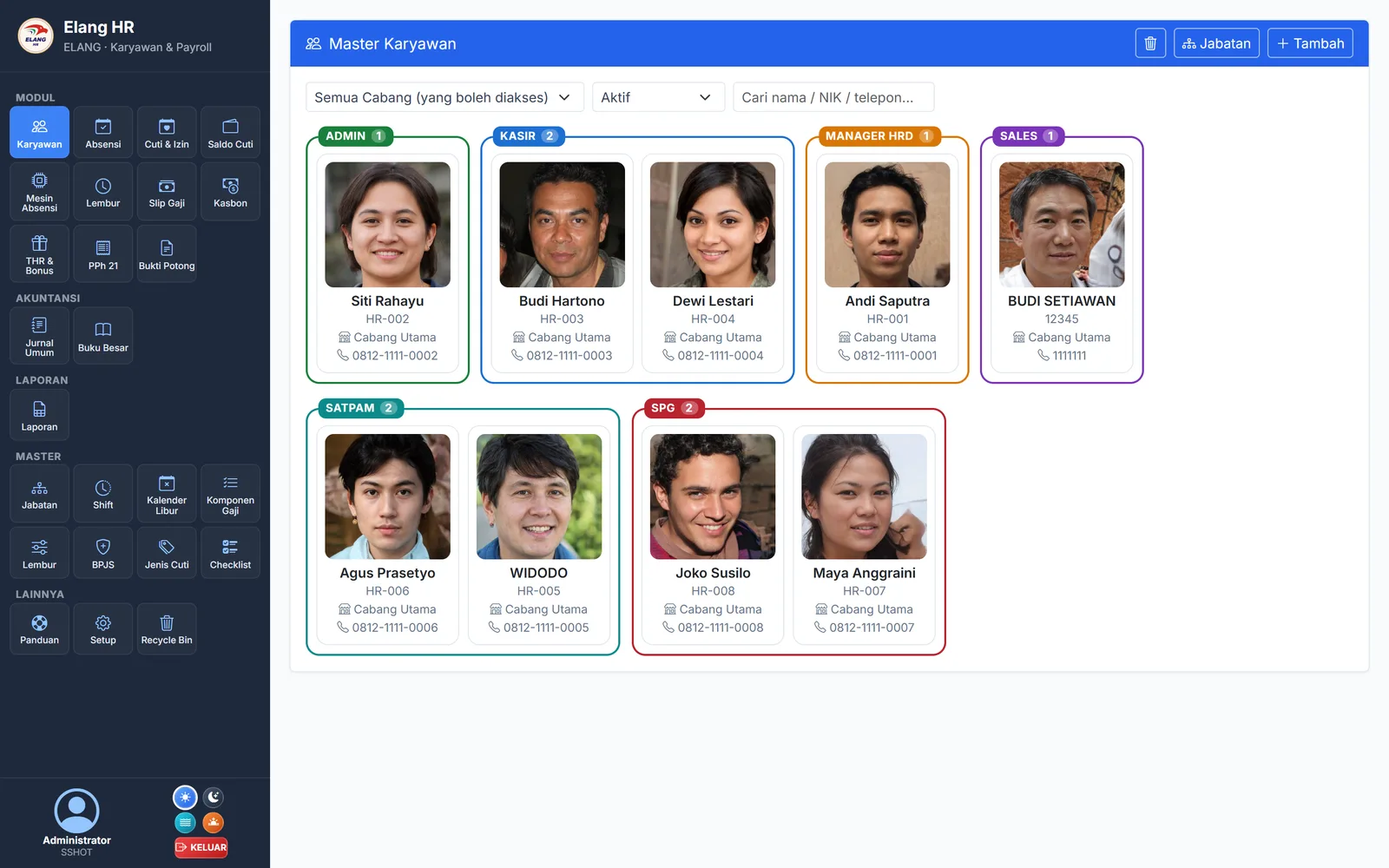
- ✓Personal details, family/dependants, and emergency contacts
- ✓Digital documents (KTP, NPWP, diplomas, certificates) with expiry dates
- ✓Fixed-term contracts (PKWT) with reminders before the contract ends
- ✓Position history, transfers, and onboarding/offboarding checklists
- ✓Recycle bin: deleted records can be restored
Face-Machine Attendance
- ✓Taps from the face machine reach the server in real time
- ✓The employee’s profile photo is used directly to enrol their face
- ✓New and deactivated employees are sent to every machine automatically
- ✓Sync the clock, pull missed taps, and re-sync a replacement machine
- ✓Machines are assigned to branches, so the tap location is recorded
Shifts, Holidays & Recaps
- ✓Schedule groups with one or many shifts, including shifts that cross midnight
- ✓Lateness tolerance and the clock-out cutoff are set in the settings
- ✓Indonesian national holiday calendar, plus collective leave days and company holidays
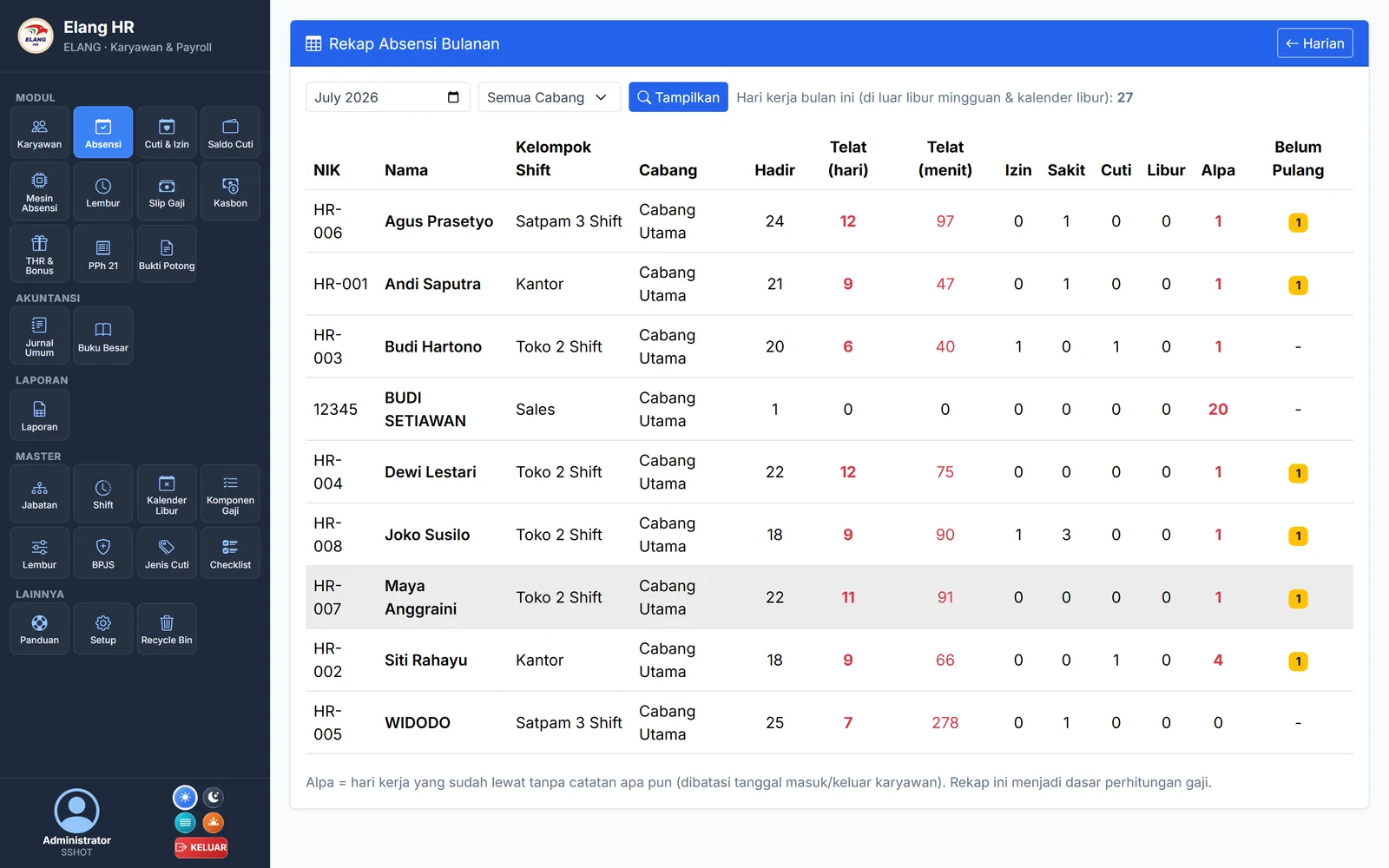
- ✓Monthly recap: present, late, permitted absence, sick, leave, holiday, absent, no clock-out
- ✓Manual corrections for missed taps, with a record of who made the correction
Leave & Permits
- ✓Set your own leave types: paid, deducted from the quota, or requiring an attachment
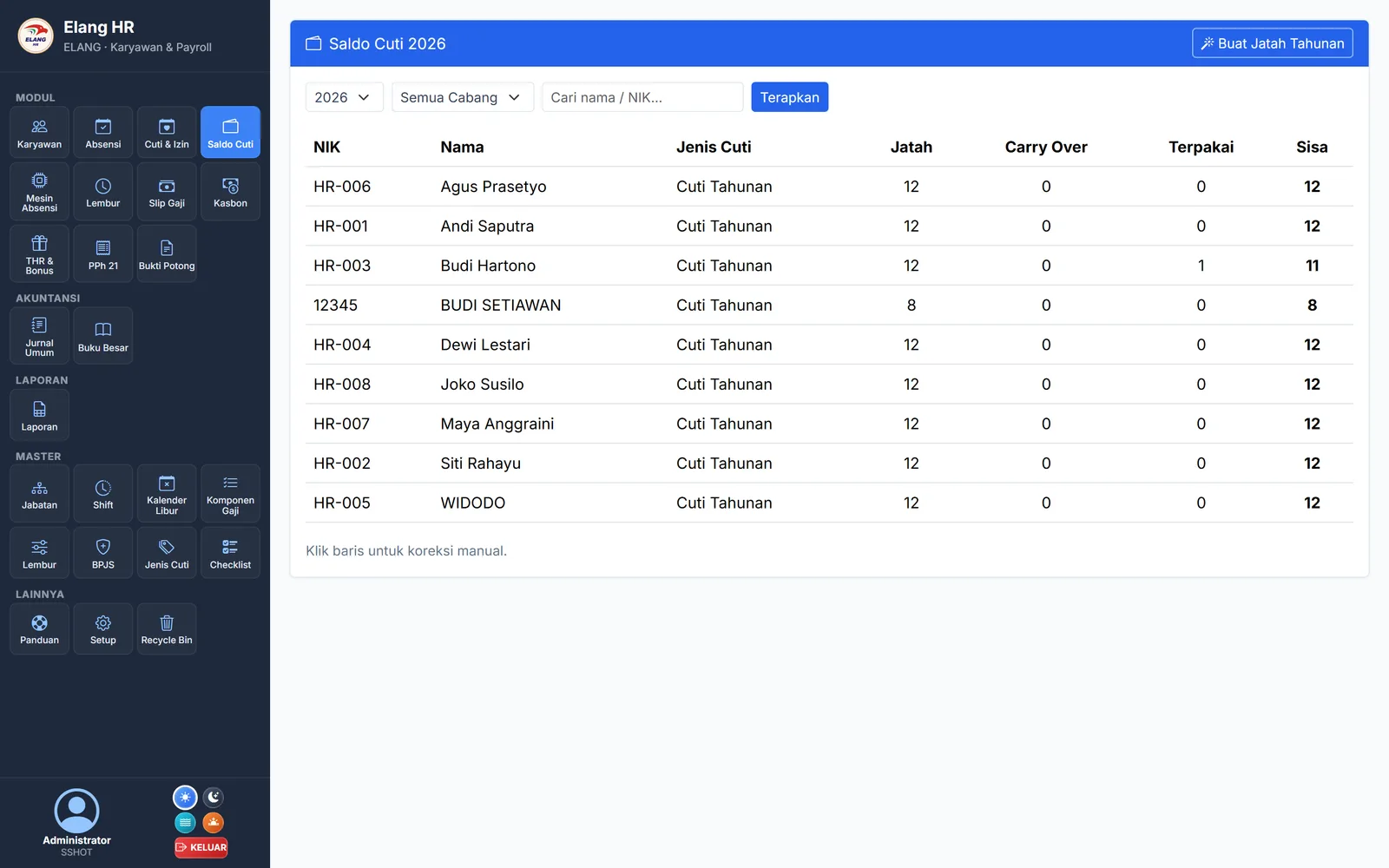
- ✓Annual quotas created automatically, with proration by length of service, carry-over, and expiry
- ✓Requests by date range; holidays are excluded automatically
- ✓Approval by the direct supervisor or HR, with a reason when a request is rejected
- ✓A team calendar shows who is on leave when, so leave doesn’t pile up on the same day
Overtime & Staff Loans
- ✓Overtime pay multipliers follow Kepmenaker 102/2004 and are stored as data
- ✓A “From attendance” button fills in overtime hours from that day’s extra time on the machine
- ✓Daily and weekly hour limits; pay is locked once approved
- ✓Staff loans with a credit limit, term, and an automatic instalment schedule
- ✓Instalments are deducted from the payslip; disbursement and repayment are recorded in the books
Payslips, BPJS & PPh 21
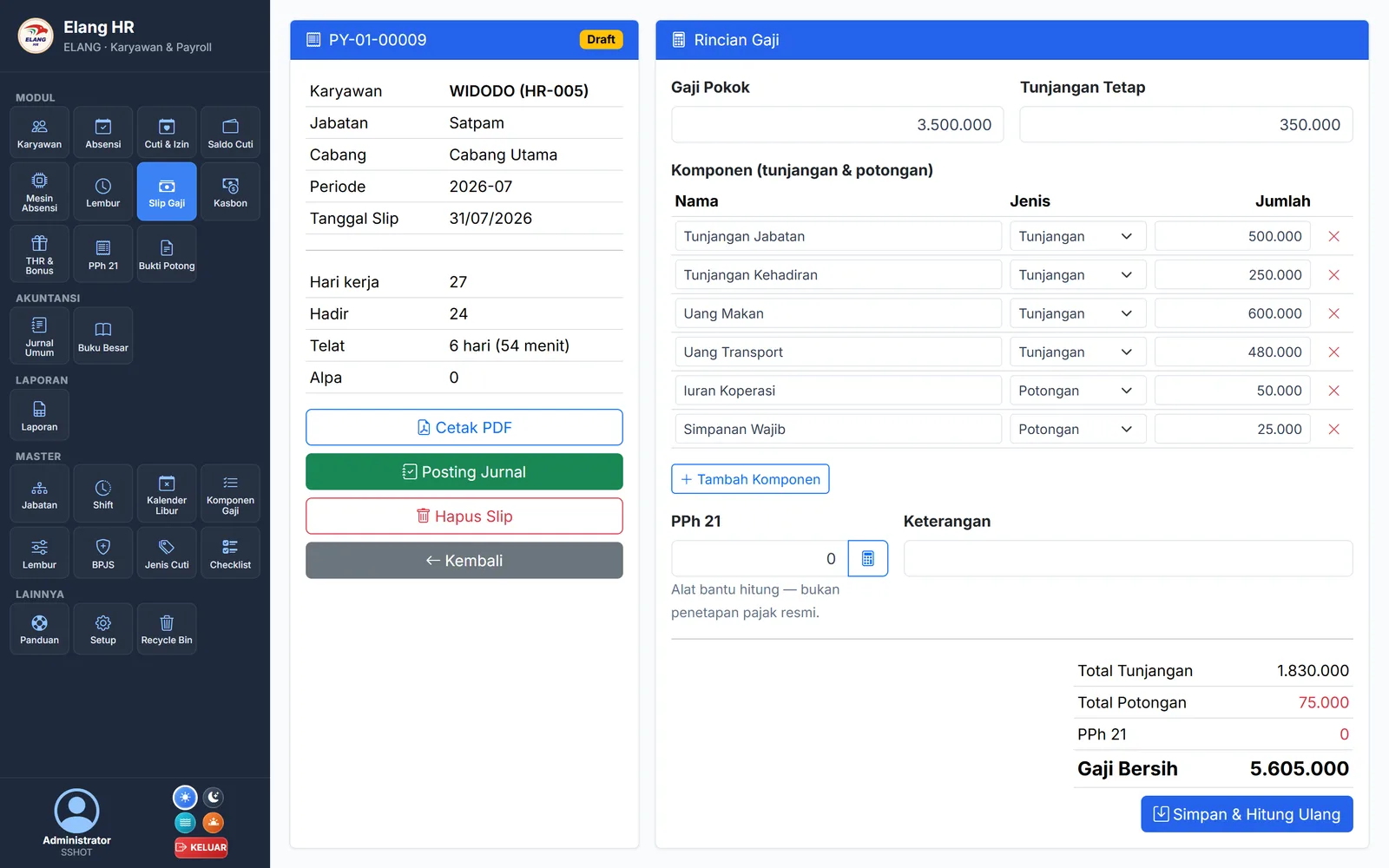
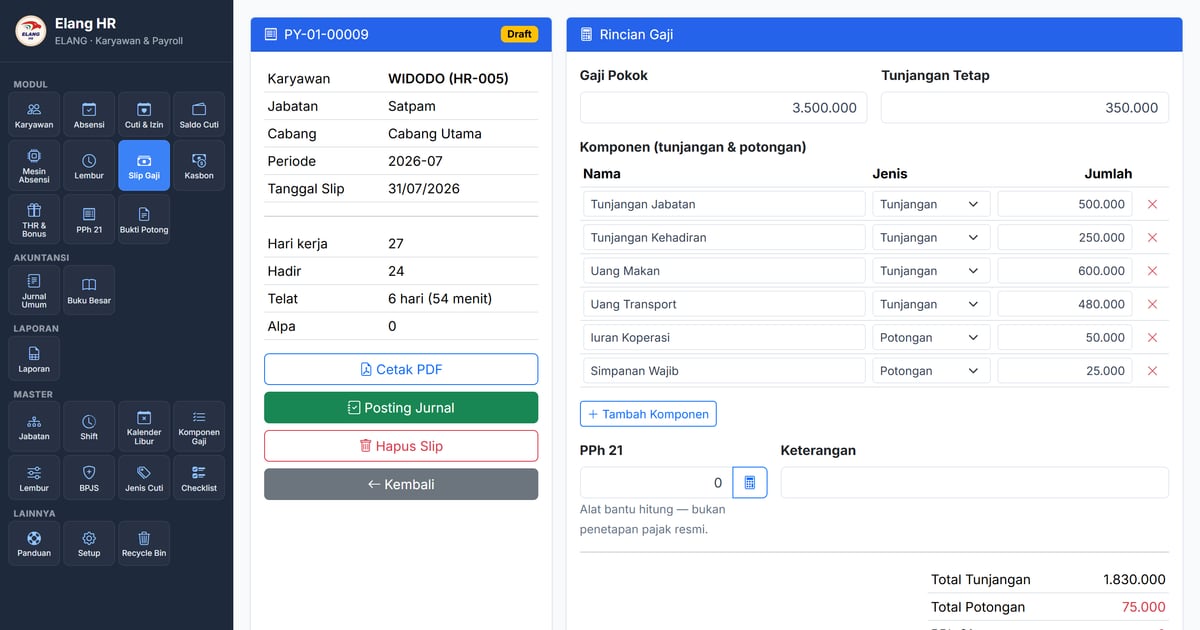
- ✓Monthly or daily allowance and deduction components (meal and transport)
- ✓Late fines, absence deductions, and unpaid leave deductions follow company policy
- ✓Automatic proration for employees who join or leave mid-month
- ✓BPJS Kesehatan (health) and BPJS Ketenagakerjaan (employment): employer and employee shares, with wage ceilings
- ✓PPh 21 at effective monthly rates (PMK 168/2023), recalculated in December; payslips as PDF
THR, Bonuses & Tax Slips
- ✓THR (religious holiday allowance) and bonuses get their own payslip, separate from monthly pay
- ✓THR is prorated by length of service automatically; bonuses as a fixed amount or a multiple of wages
- ✓The tax is calculated as irregular income
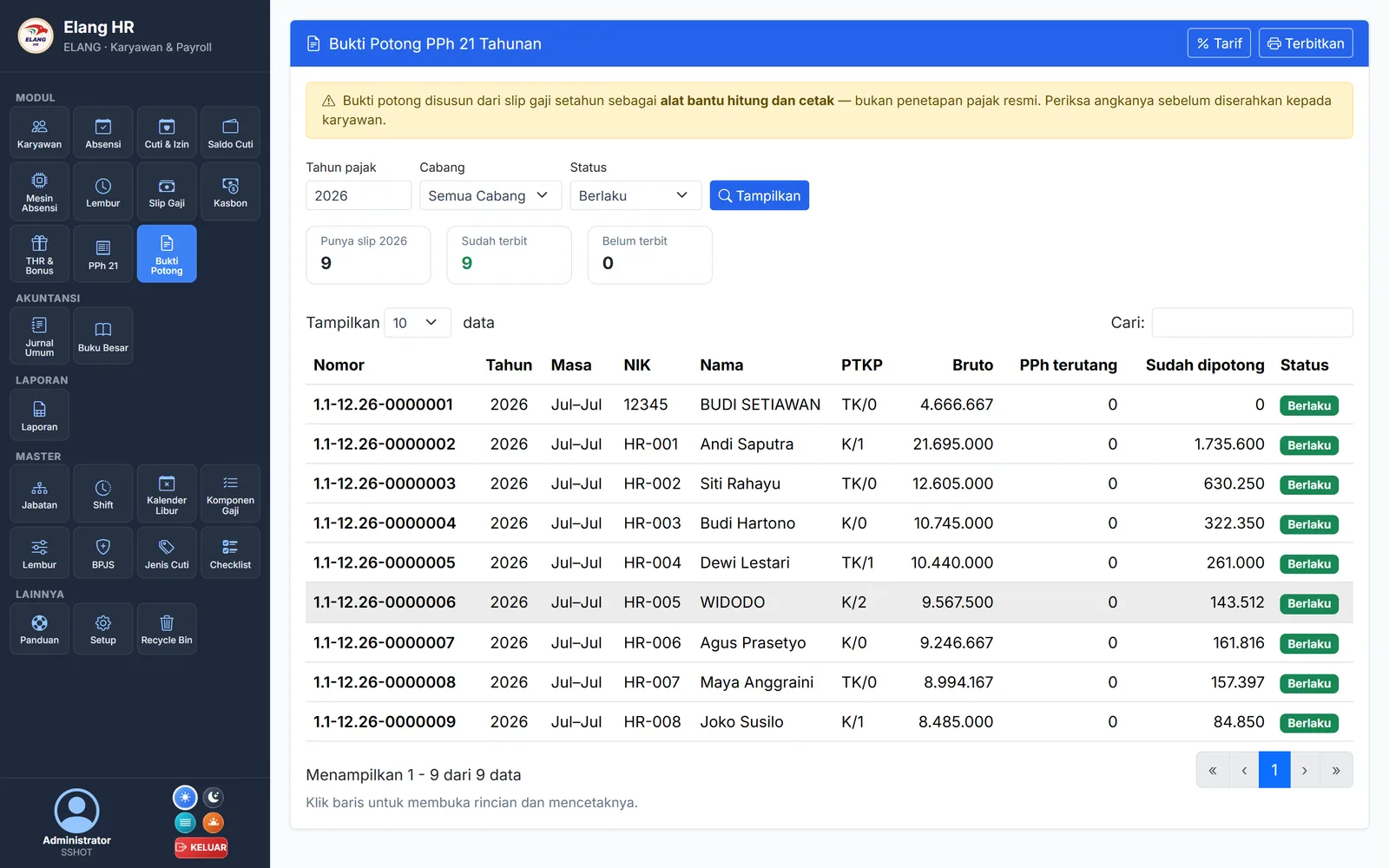
- ✓Annual PPh 21 withholding slips (1721-A1) issued in bulk each year
- ✓Corrections get their own number; employees download their tax slips from the portal
Reports & Bookkeeping
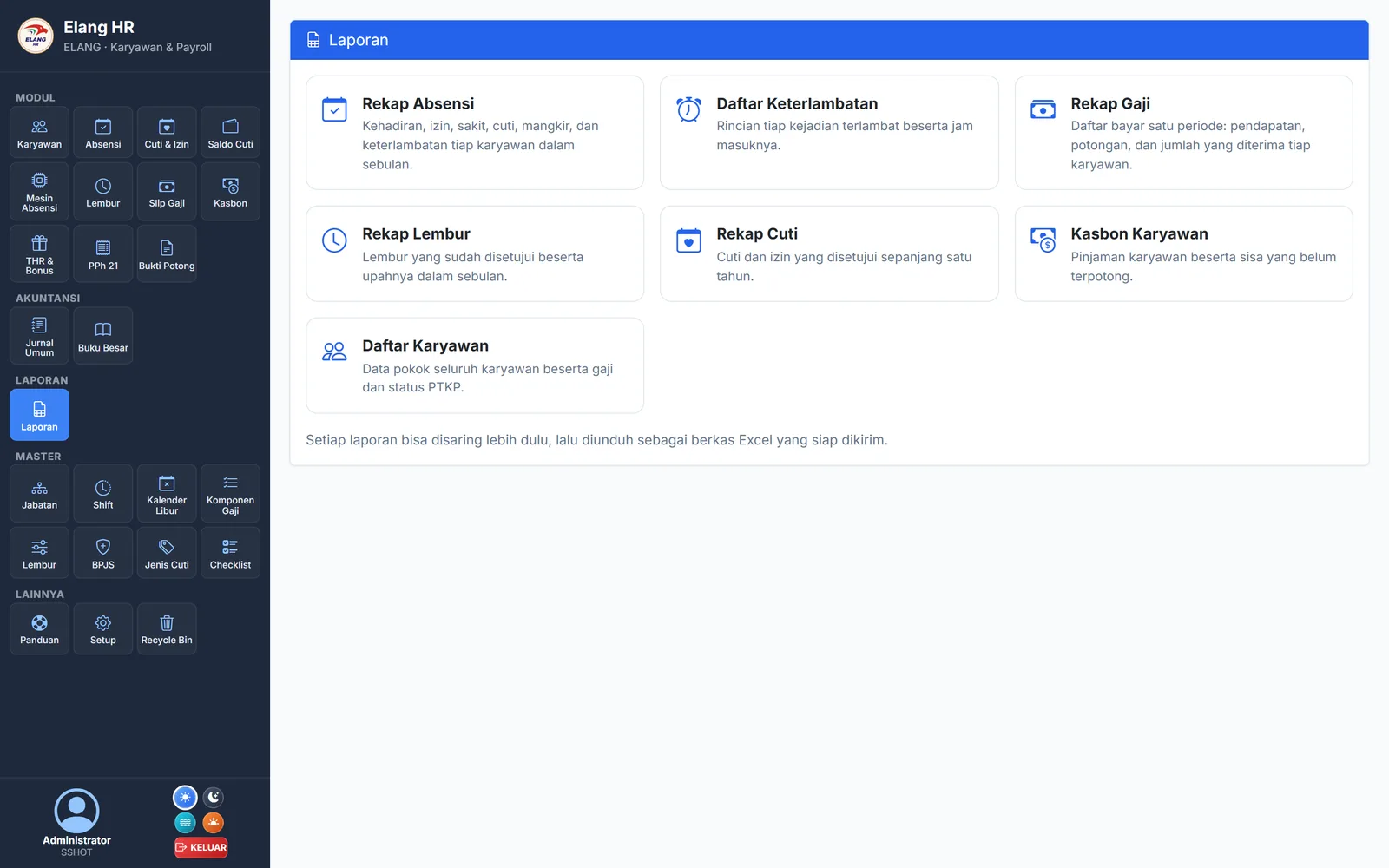
- ✓Seven reports ready to download to Excel: attendance, lateness, payroll, overtime, leave, staff loans, employees
- ✓Amount columns stay as numbers, so whoever receives the file can total them right away
- ✓Payroll journals are created as drafts and booked after the accountant reviews them
- ✓General Ledger and General Journal in the same application
- ✓Multi-branch, with per-menu access rights for each role
See the real Elang Human Resource
Screenshots taken directly from the app, not mockups.
Built from the start for Indonesian tax and labour rules
The numbers that change often are stored as data you can check and update, not embedded in the code.
PPh 21 effective rates (TER)
Monthly withholding follows PMK 168/2023, with the TER category taken from the employee’s PTKP status, then reconciled in December. Annual 1721-A1 tax slips can be issued in bulk.
BPJS with wage ceilings
Five programmes (JKN, JHT, JP, JKK, JKM), each with its own employer share, employee share, and wage ceiling. The employer contribution is recorded as an expense; the employee contribution is deducted from net pay.
Leave that follows the law
An annual quota of 12 working days as the starting point, proration for employees with less than a year of service, and carry-over with an expiry date. All of it can be adjusted to company policy.
Overtime & THR
Overtime pay multipliers are based on Kepmenaker 102/2004. THR (religious holiday allowance) is prorated by length of service and taxed as irregular income.
Where it makes the biggest difference
- ✓Retail, F&B, and service businesses with dozens to hundreds of employees across several branches
- ✓Companies that still track leave balances, overtime, and staff loans in Excel
- ✓Companies that already have, or plan to install, a face attendance machine
- ✓Owners who want payroll recorded in the books without the accountant retyping it
- ✓Companies with many employees that don’t want costs charged per employee per month
Common questions
How is this different from a subscription HRIS?+
There are three differences. First, cost: the monthly fee is fixed (server rental + maintenance), not charged per employee per month, so it doesn’t rise as your headcount grows. Second, bookkeeping: booked payslips create journal entries in the General Ledger of the same application, so there is no export file to import into separate accounting software. Third, data: all of it, including the raw taps from the attendance machine, is stored on your own server and can be exported at any time.
Do we need to use Elang ERP POS first?+
No. Elang HR can be used on its own with its own database, complete with a standard chart of accounts and journals. If you already use Elang ERP POS or Elang Resto OS, they can share one database and one login: one set of employee data, one set of financial reports. If you add the ERP later, your running HR system simply connects to it, with no re-migration.
Which attendance machines are supported?+
Face recognition machines that can send data to a server. The machine is pointed to your server address, then every tap arrives in real time and is matched to the shift schedule. Face enrolment uses the employee’s profile photo, so employees don’t have to queue at the machine one by one. You also get clock sync, a pull of missed taps if the server was down, and a full re-sync for a replacement machine. Attendance currently runs through the machine; phone-based attendance with GPS and a selfie is not available yet.
How reliable are the PPh 21 and BPJS calculations?+
PPh 21 uses the effective monthly rates (TER) under PMK 168/2023 and is recalculated in December. BPJS uses the percentage and wage ceiling of each programme. All reference figures (PTKP, tax brackets, TER, BPJS rates) are stored as data you can open and adjust, because figures like the JP wage ceiling change every year and the JKK rate follows the company’s risk class. The result is a calculation and printing tool that saves a lot of time. The final figures remain the company’s responsibility, so review them before payment.
How do employees access it?+
Through a web-based employee self-service portal (ESS) that works well on phones, with no app to install. Employees log in with their NIK (employee ID number) and a PIN from HR, then set their own PIN on first login. From the portal they can view attendance and remaining leave, submit leave/permit, overtime, and loan requests, and download final payslips and their tax slips. Employees assigned as supervisors can approve their team’s requests directly from their phones.
How are the server and data managed?+
Elang HR is fully managed by us on your own server (VPS). Server, security, updates, and backups are handled by us. The monthly fee is fixed (server rental + maintenance), not charged per user, so it doesn’t grow as your company grows. Your HR data is yours and can be exported at any time.
What is not available yet?+
So you can assess it from the start, here is what is not available yet and already on the development roadmap: phone-based attendance (GPS + selfie) for field staff, automatic notifications via WhatsApp/email, reimbursement requests, and bank transfer files for bulk salary payments. Recruitment (ATS), e-learning, and 360-degree performance reviews are intentionally left out, because they are rarely used by companies the size of our customers.
Related articles
All articles →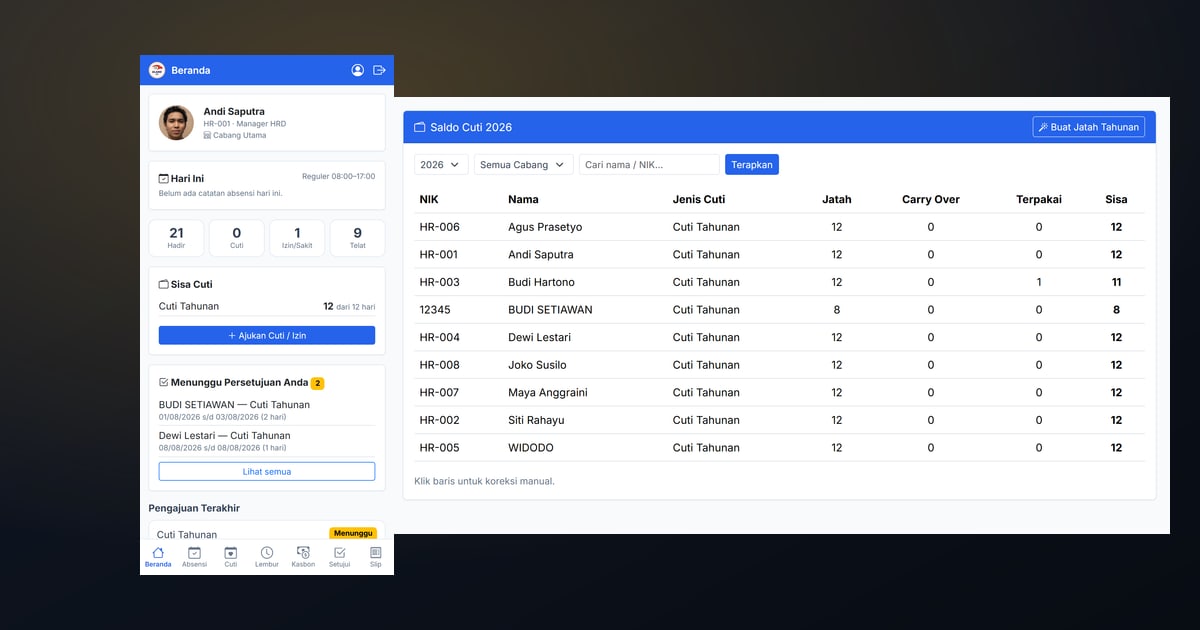
Get Leave Requests Out of the WhatsApp Group: Why You Need an Employee Portal
Leave, overtime and loan requests piled up in chat turn HR into a re-typist. Here is how an employee self-service portal works and what actually changes once it is running.
From the Attendance Machine to the Payslip Without Retyping
A face-attendance machine only stores tap times. What decides pay is everything that happens afterwards. Here is the full chain, from the face at the door to the journal in your ledger.
HR & Payroll Software for Indonesian Companies: What It Must Cover
Effective-rate income tax, BPJS wage ceilings, statutory leave, prorated religious bonus, and payroll journals. A checklist for choosing HR software Indonesian HR teams actually keep using.
Cut the HR work that still depends on Excel
Book a free demo. We’ll walk you through the flow from a tap on the face machine and a leave request on an employee’s phone to a payslip with PPh 21 and its journal entry in the General Ledger.