Lewati ke konten utama
Elang DB Manager · Database App for Windows

Check and fix database data without fear of a wrong change.

When a transaction is wrong or a report does not add up, your IT team needs to look at the database directly. Elang DB Manager opens PostgreSQL and MySQL/MariaDB databases in one window: run SQL queries, edit data, and create encrypted backups. Changes are only saved after you press Commit.

  • ✓ PostgreSQL & MySQL/MariaDB
  • ✓ Changes need a Commit
  • ✓ AES-256 encrypted backups
  • ✓ Data stays on your network

Windows 10 / 11 (64-bit & 32-bit) · version 0.3.1 · installer, no Python or PostgreSQL installation needed

Not sure which Windows you have? Open Settings, then System, then About, and check "System type". If in doubt, choose 32-bit: it installs on both 32-bit and 64-bit Windows.

Server edition for teams →

Need help? Talk to Us on WhatsApp →

The App

Query, review the result, then save or discard

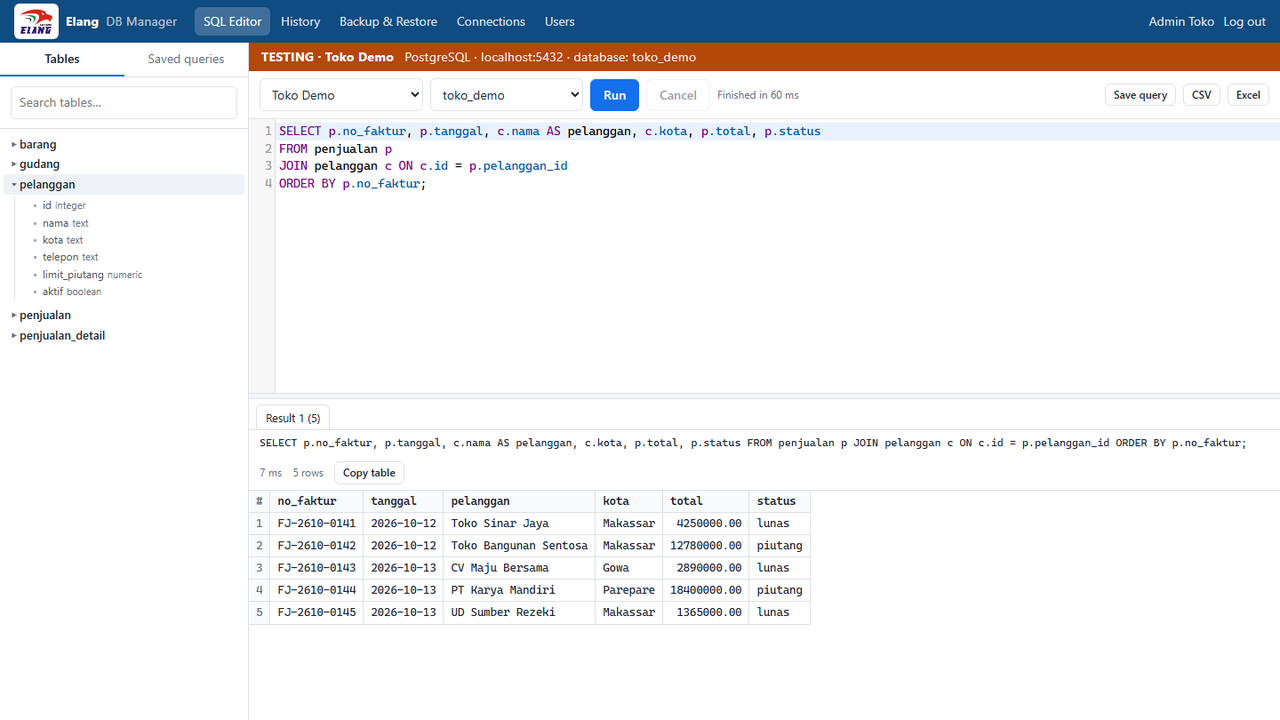
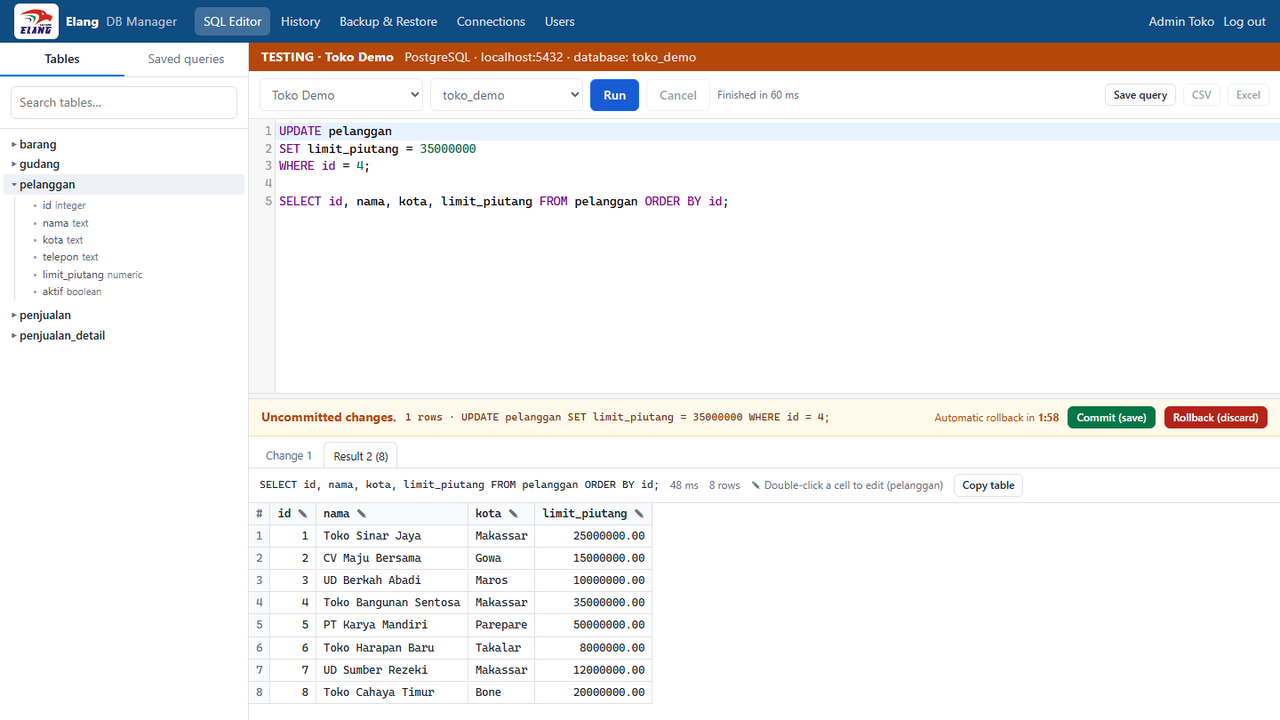
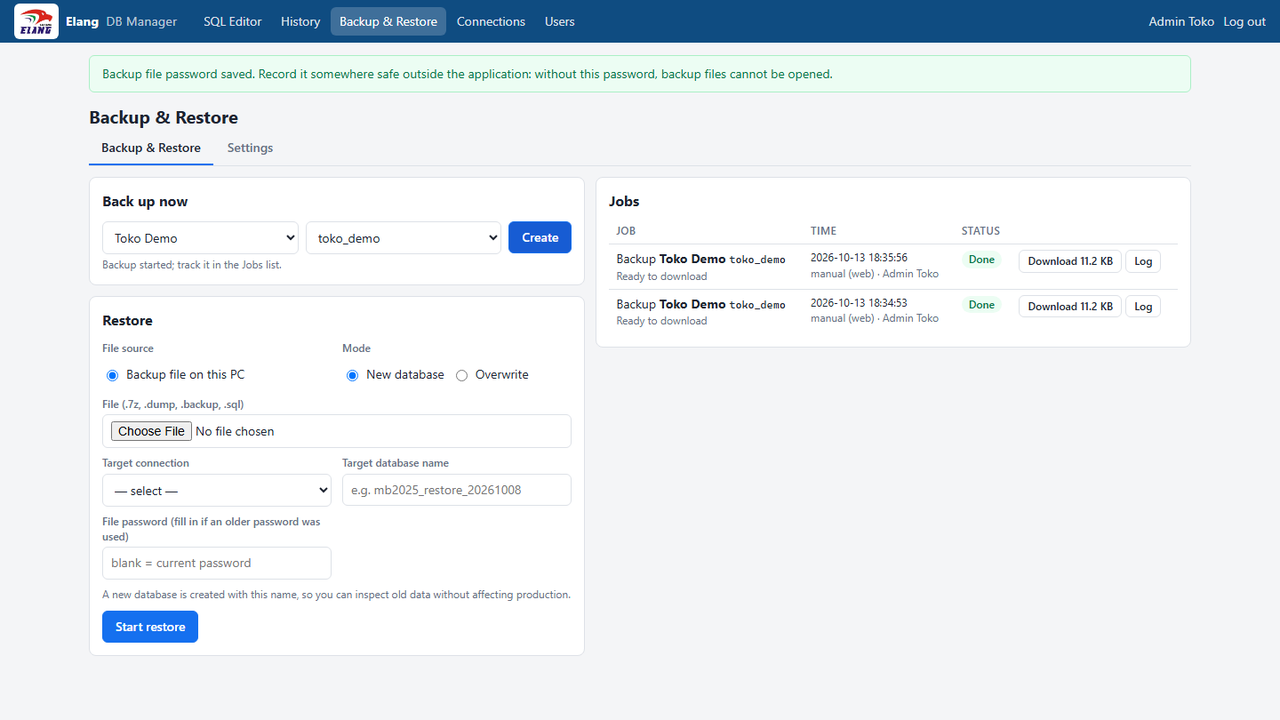
The images below are real screenshots of the app with a sample database. The banner colour above the editor shows which environment you are connected to, so a production server is never mistaken for a test server.

SQL editor: tables and columns on the left, query results below the editor. The orange banner marks a test database.
After an UPDATE, the change is held first. Choose Commit to save or Rollback to discard; after 2 minutes it is rolled back automatically.
Backup & Restore: a backup becomes an encrypted .7z file, and you choose where to save it.
Why Elang DB Manager

Change production data with a safeguard at every step

A small mistake in a production database can break reports for days. We use this app ourselves to support Laksana Elang software customers, so its safeguards come from real situations in the field.

Changes are not saved right away

After an UPDATE, DELETE, or table structure change, an "uncommitted changes" bar appears with Commit and Rollback buttons. Left alone for more than 2 minutes, the change is rolled back automatically so production tables are not locked for long.

Confirmation for risky commands

UPDATE or DELETE without WHERE, DROP, and TRUNCATE must be confirmed before they run. The banner colour follows the database environment: red for production, orange for testing, green for development.

Encrypted backups, safer restores

Backups are saved as AES-256 encrypted .7z files that open in 7-Zip with the backup password. You can restore to a new database to inspect old data without touching the database in use.

A history of every query

Every query is logged: who ran it, when, on which database, and the result. Frequently used queries can be saved for yourself or shared with your team.

How to Use

Ready in three steps

  1. 1

    Download and install

    Run the setup and choose to install for the current user only (no administrator rights) or for all users of the computer. The PostgreSQL backup programs are included.

  2. 2

    Create an admin and add a connection

    On first launch, create the app admin account. Then add a database server with its IP address, port, and user. Connection passwords are stored encrypted.

  3. 3

    Run a query or a backup

    Pick a connection and database, write a query, and press Ctrl+Enter. For a backup, pick the database and choose where to save the .7z file.

Good For

For teams who look after databases every day

  • ✓ In-house IT teams: Check and fix transaction data on store, office, or warehouse servers.
  • ✓ Software vendors & consultants: Help customers inspect their data without installing many database tools.
  • ✓ Before a big change: Take an encrypted backup first, then run the change with Commit and Rollback.
  • ✓ Inspecting old data: Restore a backup to a new database to compare data without touching the live one.
  • ✓ Ad-hoc reports: Run a query, then export all its rows to CSV or Excel.
Specifications

App information

Operating system
Windows 10 / 11 (64-bit & 32-bit)
Version
0.3.1
File size
64-bit 36 MB · 32-bit 30 MB
Databases
PostgreSQL, MySQL, MariaDB
Backup programs
PostgreSQL pg_dump/pg_restore included; MySQL/MariaDB uses mysqldump copied into the tools folder
Interface language
English
App data storage
On your computer (%LOCALAPPDATA%\ElangDBManager)
Cost
Free to use
For Teams

Server edition for multiple users

If several people manage your databases or you need automatic daily backups, Elang DB Manager is also available as a web app on your own server. The Laksana Elang team can help you set it up, with:

Discuss your team’s needs →
  • ✓User management by an admin, with separate Elang team accounts
  • ✓Scheduled daily backups to a PC through Elang Backup Agent
  • ✓A reminder when a backup was missed because the PC was off
  • ✓Restores from files stored on the agent PC
  • ✓Connections to databases on other networks through Tailscale
FAQ

Frequently asked questions

Why is Elang DB Manager free?

We built this app for the Laksana Elang team’s own technical support work, then shared it at no cost. We hope you will think of Laksana Elang when your business needs POS, HR, ERP, or CCTV systems. The server edition and company installation are available as a separate service.

Is my database data sent to Laksana Elang servers?

No. The app runs on your computer and connects directly to the database server on your network. Your connection list, app users, and query history are also stored on that computer.

What if I forget to press Commit?

Uncommitted changes are rolled back automatically after 2 minutes, and also when the app is closed. If an error occurs in the middle of a transaction, all uncommitted changes are rolled back as well.

Which PostgreSQL versions are supported?

The installer ships PostgreSQL 18 pg_dump and pg_restore, which can back up PostgreSQL servers version 18 and earlier. If needed, other versions can be copied into the tools folder; the app picks the version that best matches the server.

Should I choose the 64-bit or 32-bit setup?

Almost every PC and laptop today runs 64-bit Windows, so choose the 64-bit setup. The 32-bit setup is for older PCs running 32-bit Windows 10; it also installs on 64-bit Windows. Check your Windows version in Settings, then System, then About, on the "System type" line. Installing one version over the other counts as an update, not a second app.

Why does Windows show a warning when I run the setup?

Windows SmartScreen may show a warning for apps without a digital signature (code signing). Choose "More info", then "Run anyway". Always download the app from the official Laksana Elang website.

How do I move the app data to another computer?

Copy the %LOCALAPPDATA%\ElangDBManager folder to the new computer, including the keys.json file inside it. Without keys.json, stored connection and backup passwords cannot be opened.

Get Started

Check data calmly, save once you are sure.

Download Elang DB Manager and connect to your database in a few minutes. Need the server edition or help with installation? The Laksana Elang team is ready to help on WhatsApp.

Using 32-bit Windows? Download 32-bit — 30 MB

Contact Us