Lewati ke konten utama
Elang Remote Desktop · Remote Desktop for Windows

Reach and support computers remotely, fast, secure, and simple.

Your technicians can fix problems on branch or customer computers without leaving the office. Elang Remote Desktop lets you access and control computers remotely for technical support, everyday work, and company operations. No account needed: run the app, enter the device ID, and connect.

  • ✓ Relay servers in Indonesia
  • ✓ End-to-end encryption
  • ✓ No account registration
  • ✓ Free to use

Windows 10 / 11 (64-bit) · version 1.5.1 · portable, runs straight away without installation

Need help? Talk to Us on WhatsApp →

The App

Simple and ready to use

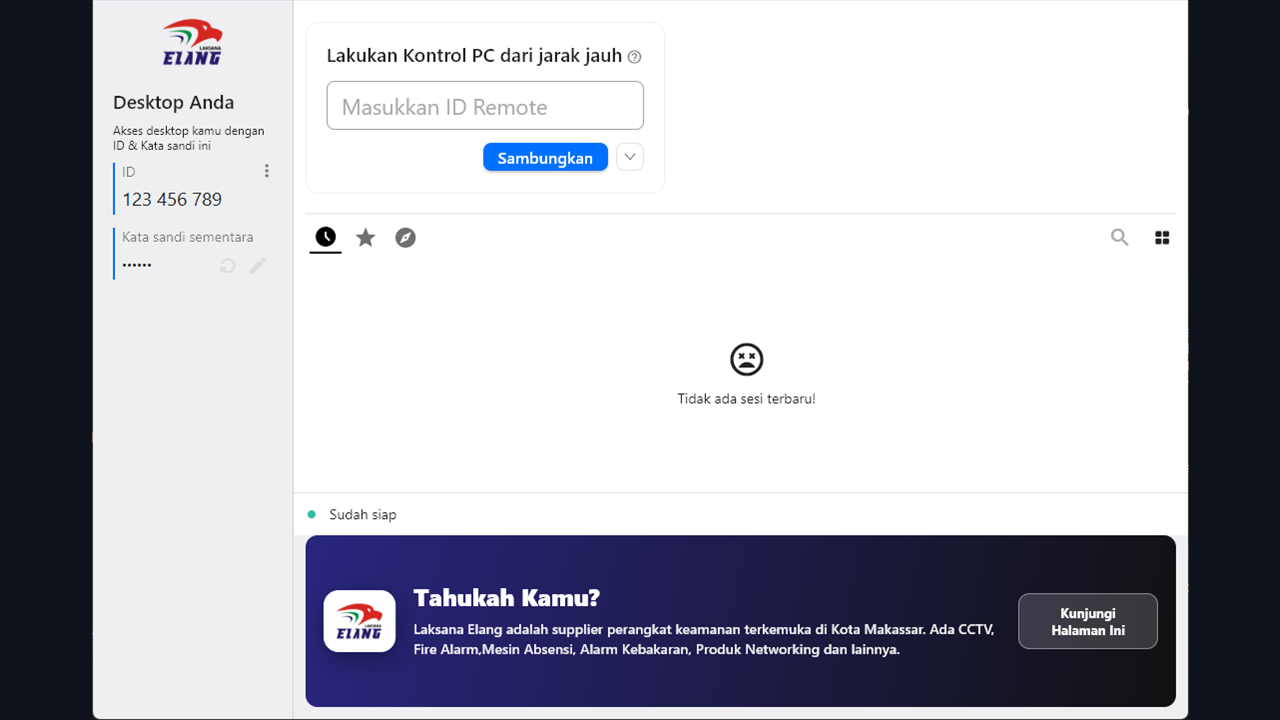
The screen is simple enough for non-technical staff to use. As soon as the app runs, the device ID and password appear, ready to start a connection. The image below is a real screenshot of the app; the ID number has been replaced with a sample.

Elang Remote Desktop home screen: device ID and one-time password in the left panel, connection field in the right panel.
Why Elang Remote Desktop

Remote support that stays smooth on Indonesian networks

We first used this app ourselves to support software and CCTV clients across Indonesia, then released it to the public. Its relay servers are in the country, so connections stay responsive even when two devices cannot connect to each other directly.

Relay infrastructure in Indonesia

The relay server is in Jakarta, which helps keep latency low, especially for users reaching devices on Indonesian networks. The system tries a direct connection between devices first and uses the relay only when a direct connection is not possible.

End-to-end encrypted connection

All communication is end-to-end encrypted for the whole session. Screen content and remote activity are not stored on Elang Remote Desktop servers; the server only brokers the connection.

Indonesian-language interface

The whole interface is available in Indonesian, so staff, customers, and users who are not used to English technical terms can follow along easily.

Portable, no account needed

Runs straight away without installation or account registration. Free for personal and business use, with no limit on time or number of devices.

How to Use

Connected in three steps

  1. 1

    Download and run

    Download Elang Remote Desktop and run it. Because it is portable, you can use it straight away without installing. Installation is only needed if the computer must always be ready for remote access.

  2. 2

    Enter the ID and password

    The computer you want to reach shows a device ID and a one-time password. Enter both on the computer you are connecting from.

  3. 3

    Start the session

    Once authenticated, the remote screen appears and you can control it with your mouse and keyboard. You can also send files and chat during the session.

Good For

One app for many kinds of remote support

  • ✓ IT support — Fix problems on user or branch-office computers without travelling to the site.
  • ✓ Software support — Guide customers through installation, configuration, troubleshooting, or training.
  • ✓ Remote work — Reach your office computer from another location when you need it.
  • ✓ Multi-branch operations — Make it easier for IT teams to look after computers across branches and operational sites.
  • ✓ Servers & POS — Checks and technical support for cashier computers, workstations, and operational servers.
Specifications

App information

Operating system
Windows 10 / 11 (64-bit)
Version
1.5.1
File size
24 MB
Installation
Optional; runs as a portable app
Account
Not required
Cost
Free to use, with no limit on time or number of devices
Relay server
Indonesia (Jakarta)
For Companies

Remote desktop for business needs

Running many computers or several branch offices? Elang Remote Desktop can be part of your company’s remote support setup. For more complex needs, the Laksana Elang team can help you set up:

Discuss your company’s needs →
  • ✓Private remote desktop infrastructure on your internal network
  • ✓Dedicated relay server
  • ✓Access policies for each employee
  • ✓Management of many devices from one place
  • ✓Session records (audit log)
  • ✓Integration with your internal company systems
FAQ

Frequently asked questions

Why is Elang Remote Desktop free?

We built this app to provide technical support to Laksana Elang customers, so its running costs are already covered. We release it to the public free of charge and with no time limit, in the hope that you will think of Laksana Elang as your IT partner when your business needs a POS, HR, or CCTV system. Companies that need dedicated infrastructure can use our separate implementation service.

Is the connection secure?

A session can only start after the person being helped shares their one-time password, and all communication is end-to-end encrypted. The server only brokers the connection and does not store screen content. The app is built on open-source software, so its source code can be audited publicly.

Do I need to install the app?

No. For occasional use, the app runs straight away in portable mode. Installation is only needed if the computer must always be reachable remotely, even with nobody in front of it.

Why does Windows show a warning when the app runs?

Windows SmartScreen may show a warning because the app is still building its download reputation with Microsoft. Windows Firewall also asks for permission because the app needs network access. Choose "More info", then "Run anyway", and allow network access. We are obtaining a code-signing certificate so this warning no longer appears. Always download the app from the official Laksana Elang website.

Is it available for Android, macOS, or Linux?

The official release is currently for Windows 64-bit, which is what most of our clients need. We are evaluating other platforms based on user demand. Tell us what you need on WhatsApp.

Can a company with many computers use it?

Yes, at no extra cost for standard use. If your company needs a dedicated relay server, user access settings, device management, or a custom configuration, contact the Laksana Elang team for a consultation.

Get Started

Help from a distance, solve problems faster.

Download Elang Remote Desktop and connect to another computer in a few steps, with no account and no complicated setup. Need help or a solution for your company? The Laksana Elang team is ready to help on WhatsApp.

Contact Us