
 Elang Course
 Run your course center from enrollment to certificate, without re-entering data.
Prospective students register online, you approve them, and their portal account, invoice, and accounting journal are created automatically. Elang Course Management brings together your institution’s website, enrollment, classes and an online learning room (LMS), invoices and installments, instructor fees, QR certificates, and profit and loss per class. We set it up and maintain it on your own server for a fixed monthly fee.

More students, and more paperwork piling up
Most course centers run into the same issues as they grow. Here is what usually happens, and how Elang Course Management solves it.
Registrations scattered across WhatsApp and Excel
ProblemApplicant data is spread across chats and several files. ID photos get hunted down again, and remaining class seats are counted by hand.
With ElangAn online form with photo and ID card upload. When an applicant is approved, the seat is locked and a full class is marked “Full” automatically.
Invoices and installments slip through the cracks
ProblemWho has paid the deposit and who is behind on installments has to be matched by hand against bank statements.
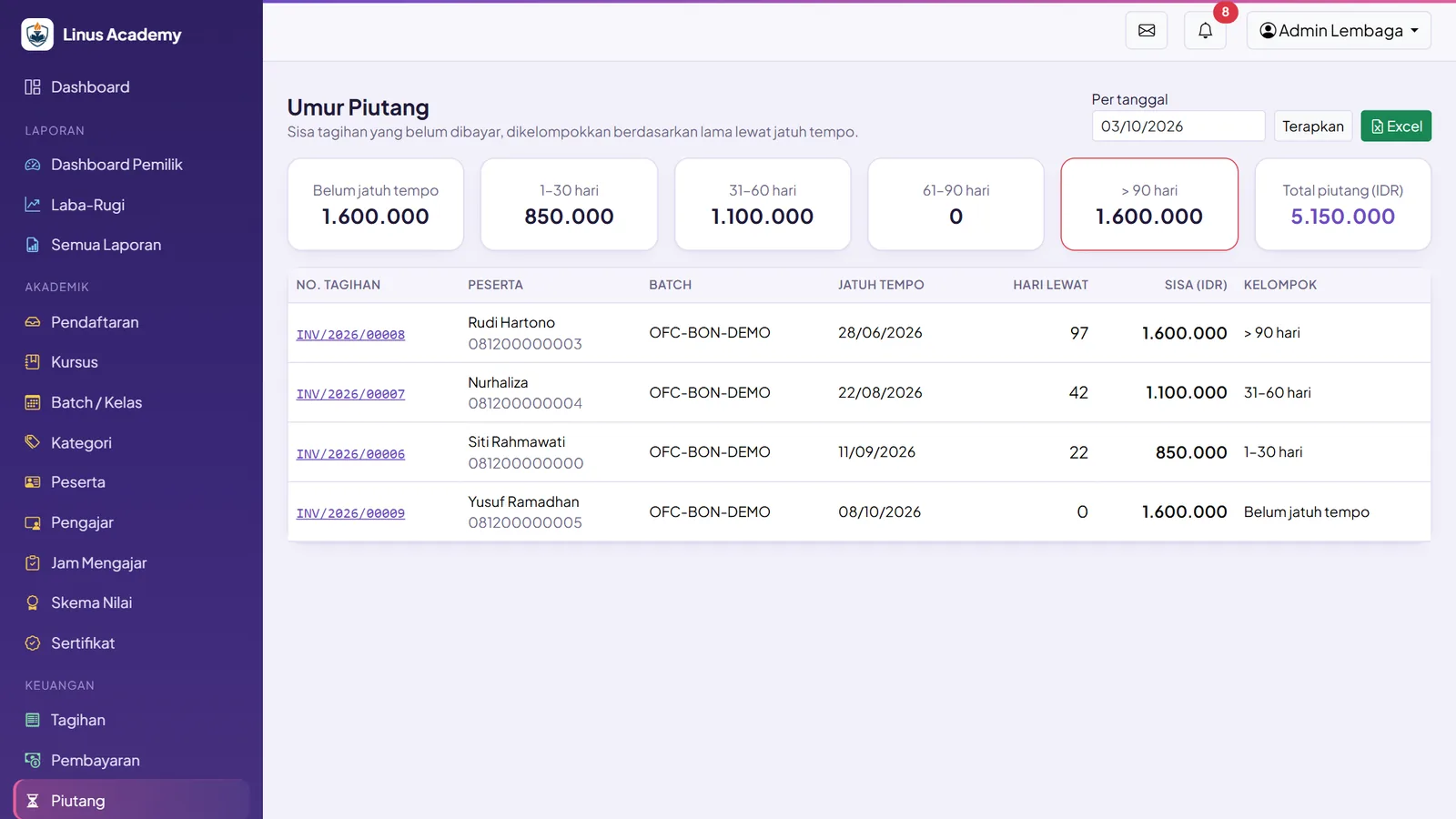
With ElangInvoices are issued automatically, students upload their payment proof, and receivables aging is shown by day bracket.
Instructor fees calculated by hand
ProblemTeaching hours are collected from paper notes, then recalculated on a calculator at the end of every month.
With ElangFees are calculated automatically from approved teaching attendance, with a PDF fee slip.
Certificates made one by one, and easy to fake
ProblemTyping each student’s name and certificate number takes time, and printed certificates are easy for others to copy.
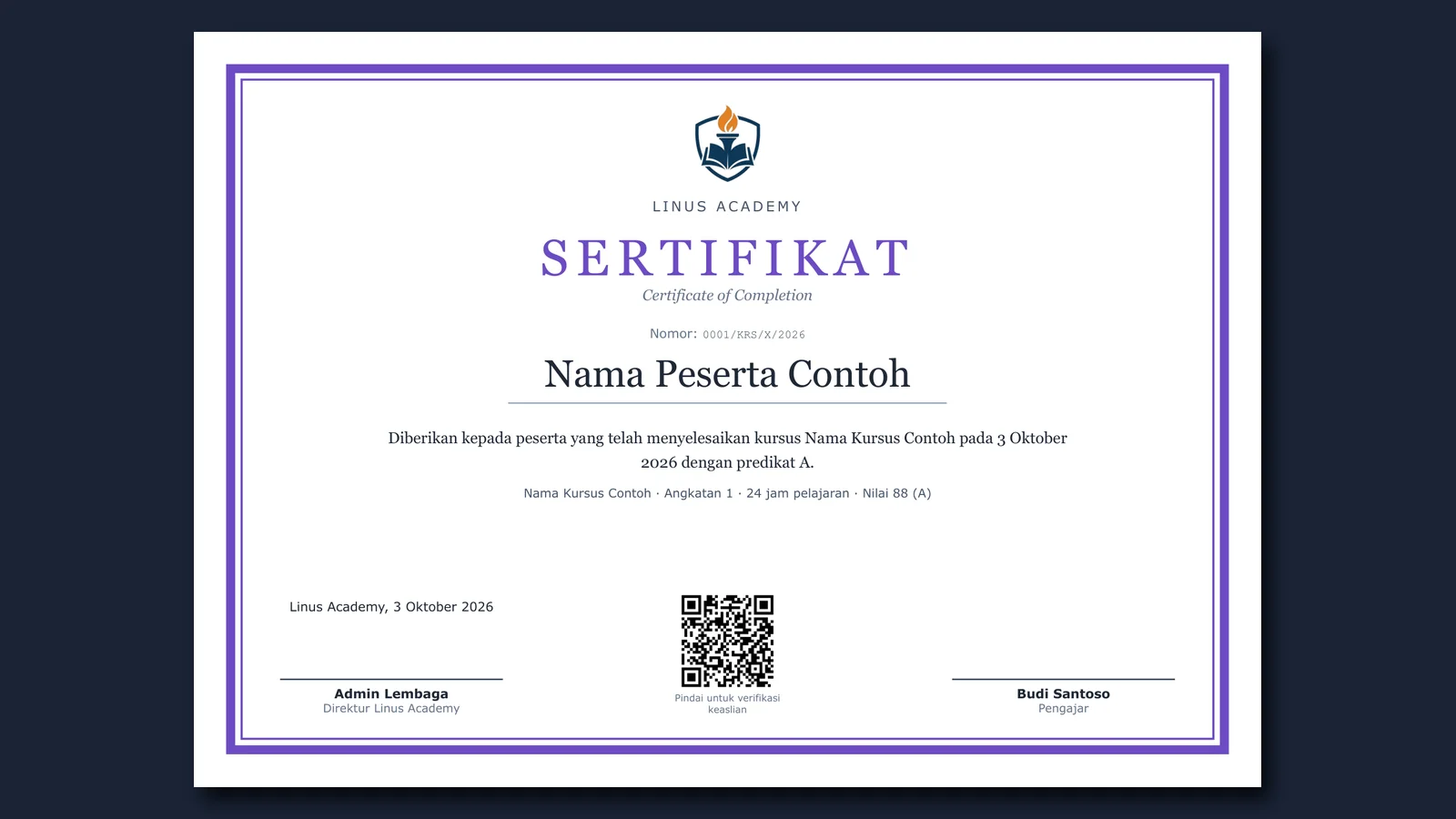
With ElangPDF certificates are issued in bulk with automatic numbering and a QR code anyone can use to check authenticity.
No idea which classes are profitable
ProblemRevenue is visible, but instructor and operating costs are never calculated per class.
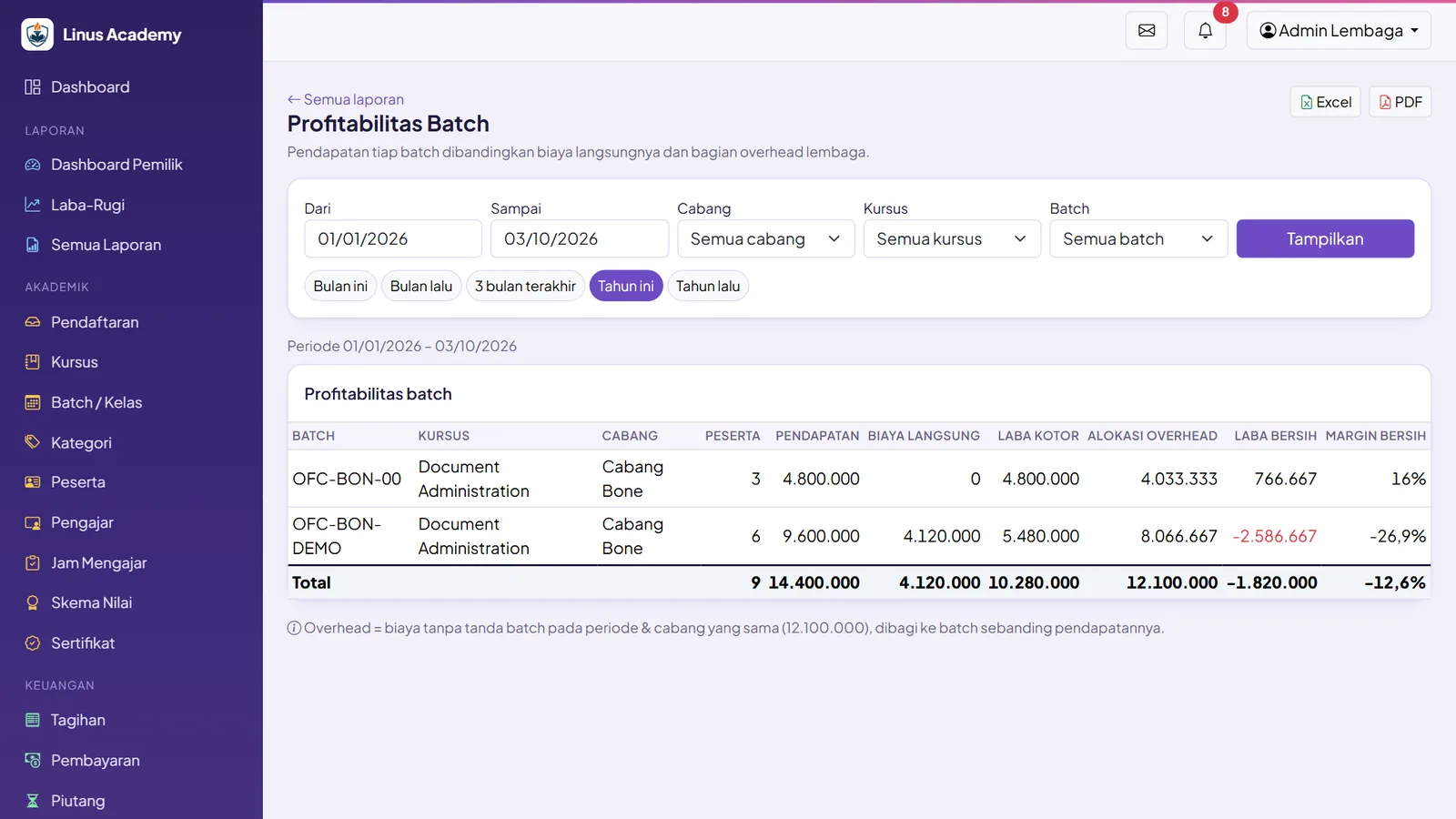
With ElangProfit and loss down to each batch, including overhead allocation. You know which classes are worth running again.
One workflow from the registration form to the books
Once an applicant is approved, the student record, portal account, invoice, payment, and accounting journal follow in sequence from the same data.
Approved teaching attendance becomes the basis for fees right away. No more month-end tallying of teaching hours.
See the profit or loss of every batch, with overhead allocation. Decide which classes to open next based on the numbers.
Every certificate carries a QR code. Anyone who scans it sees its status: VALID, REVOKED, or EXPIRED.
Unbalanced journals are rejected by the database, and journal lines that have been recorded cannot be changed.
Six steps, one set of data
Student data is entered once, at registration. Every later step uses that same data, so staff never retype it somewhere else.
- 📝 01
Register online
Prospective students fill in the form on your institution’s website, upload a photo and ID card, and receive a personal status link to track progress and correct their data.
- ✅ 02
Approved
Staff verify and approve. The student number, class enrollment, and portal account are created automatically, and the class seat is locked right away.
- 📚 03
Classes & LMS
Schedules are built with the recurring schedule generator. Instructors take attendance, while students open materials, submit assignments, and join discussions in the online classroom.
- 💳 04
Invoices & payments
The invoice is issued when the student is approved. Students pay in full, in installments, or with a deposit, then upload their payment proof. Once verified, the journal is recorded automatically.
- 🎓 05
Certificates
Graduation requirements (grades, attendance, assignments, full payment) are checked automatically. QR-coded PDF certificates and transcripts are issued in bulk.
- 📈 06
Reports
The owner sees profit and loss per branch, course, and batch, cash flow, and course performance. Every report can be exported to Excel and PDF.
Everything a course center needs, available from day one
Institution Website & CMS
- ✓A homepage you manage yourself: hero, highlights, statistics, testimonials, FAQ, banners, and footer
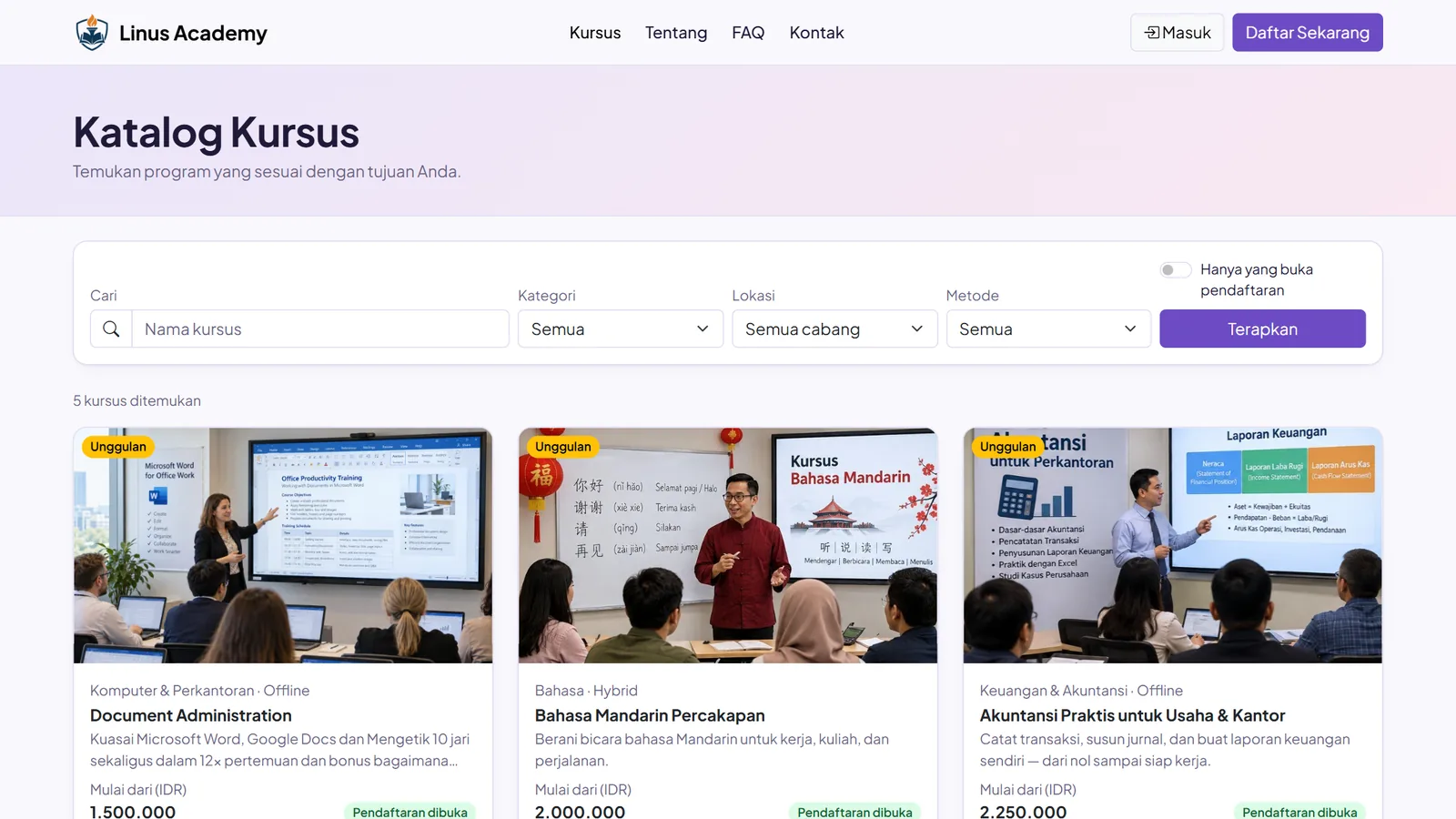
- ✓Course catalog with filters and search
- ✓Course details showing batch schedules, remaining seats, and fees
- ✓About, Terms, Privacy, FAQ, and Contact pages per branch
- ✓Color theme per institution (5 presets + primary color), plus your own logo and favicon
- ✓Search-engine ready (slugs, OpenGraph, canonical, sitemap)
Online Enrollment
- ✓A 4-section form with photo and ID card upload and cropping
- ✓16-digit NIK (national ID) validation and applicant source tracking (UTM/ref)
- ✓Personal status link: applicants track progress, correct their data, and set a portal password
- ✓Back office: verify, approve, request corrections, reject, and confirm payment
- ✓On approval: student number, class enrollment, and portal account are created automatically
- ✓Seats are locked, and a batch is marked “Full” automatically when it runs out
Courses, Classes & Instructors
- ✓Courses, batches/classes, and categories in one place
- ✓Tabbed student profiles: timeline, documents, and automatic alumni status
- ✓Permanent, freelance, or guest instructors, with 5 fee schemes
- ✓Grading schemes configurable per institution
- ✓Multi-branch, with roles that can be limited per branch
Schedules & Attendance
- ✓Recurring schedule generator: days, times, number of sessions, holidays, and topics from the syllabus
- ✓Attendance as Present, Late, Excused, Sick, or Absent
- ✓Attendance percentage calculated automatically
- ✓Locked attendance can only be corrected with a reason, and is recorded in the change history (audit log)
- ✓Instructor attendance and teaching hours approved in bulk
Online Classroom (LMS)
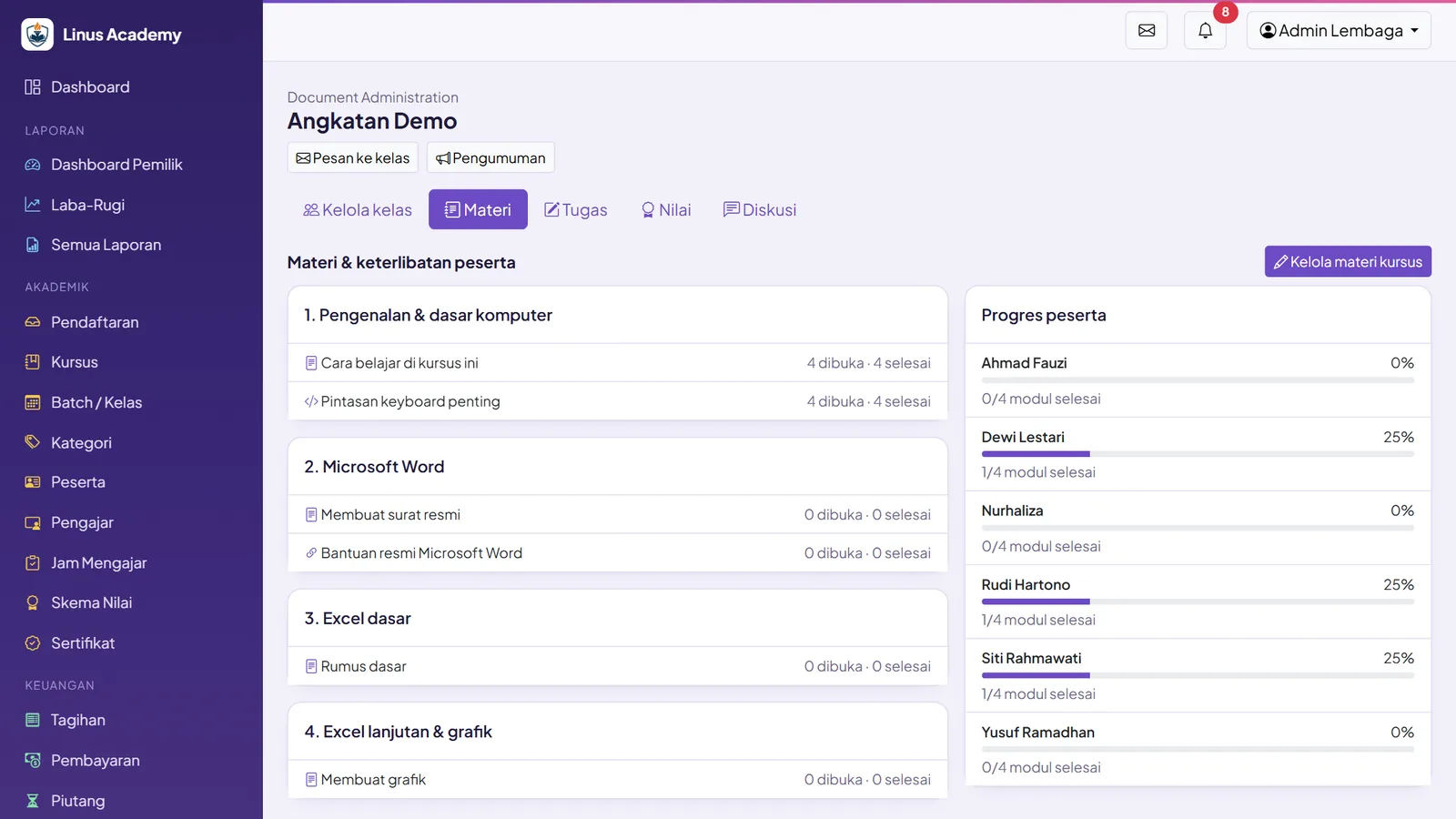
- ✓Text, PDF, documents, images, uploaded video (up to 500 MB), YouTube, links, downloads, and code
- ✓Module release: immediately, on a set date, N days after the batch starts, or after a prerequisite module is completed
- ✓Video progress tracked (≥90% watched counts as complete)
- ✓Assignments with late rules (accept, deduct points, or reject), numbered revisions, and automatic late deductions
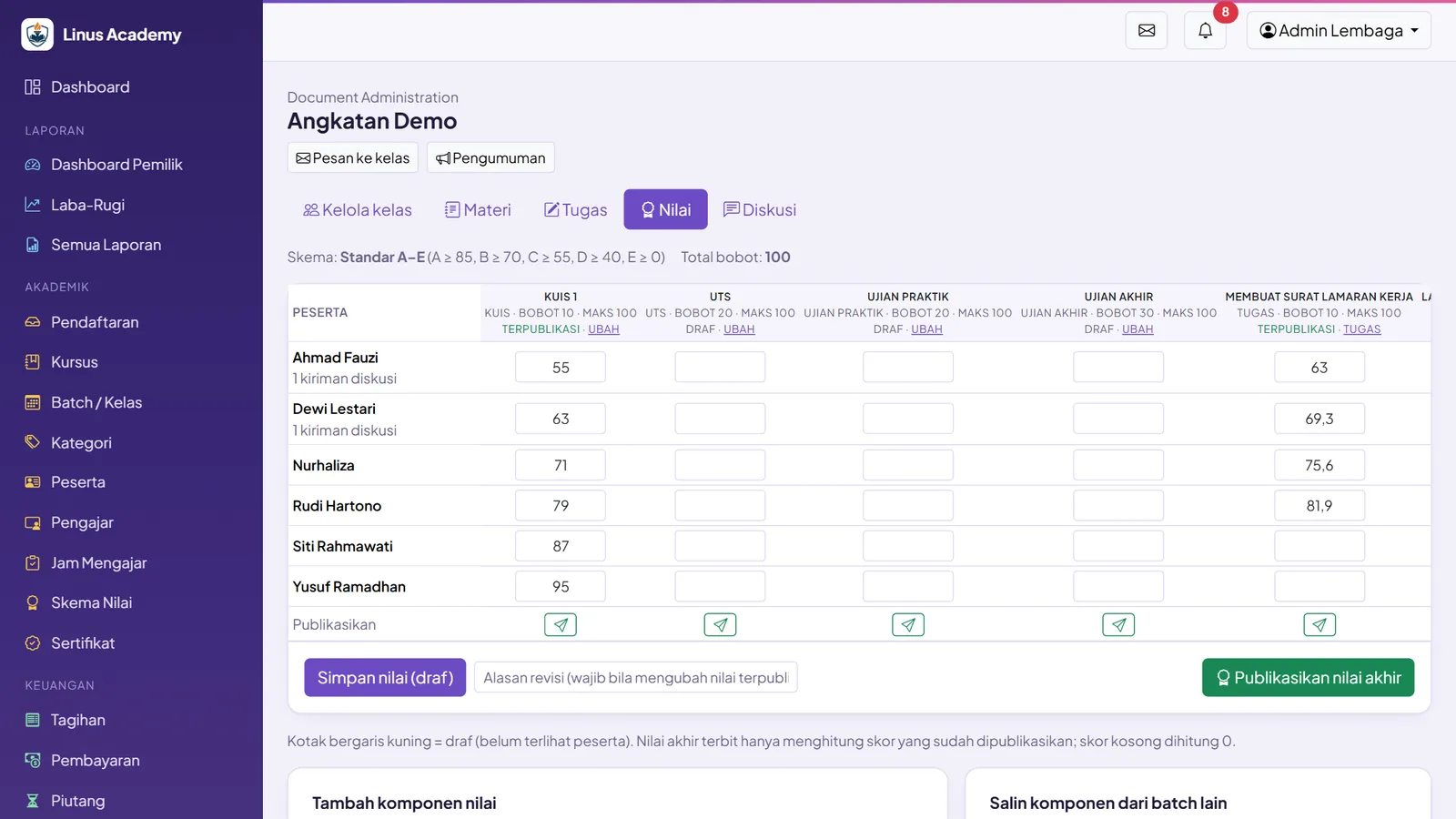
- ✓Weighted gradebook: quizzes, assignments, midterm, final exam, practical, and discussion participation
- ✓Grades flow Draft → Published → Revised, letter grades from the scheme, and a discussion forum per batch
Certificates & Graduation
- ✓Graduation requirements per course: grades, attendance, required assignments, required grade components, and full payment
- ✓Graduation calculated automatically and processed in bulk
- ✓PDF certificates from a template: logo, 2 signatures, and background
- ✓Automatic certificate numbers (e.g. 0001/OFC/X/2026) and a verification QR code
- ✓A public /verifikasi (verification) page showing VALID, REVOKED, or EXPIRED
- ✓Transcripts in PDF
Invoices & Payments
- ✓Invoices issued automatically on approval: course fee, registration, materials, discounts, and tax
- ✓Pay in full, in installments, or with a deposit at a minimum percentage
- ✓Payment method recording: cash, bank transfer, QRIS, VA, and card
- ✓Students upload payment proof and staff verify it; overpayments become student credit
- ✓Receivables aging: current, 1–30, 31–60, 61–90, and >90 days
- ✓PDF invoices and receipts with the amount written in words
- ✓Operating expenses go through approval; whoever creates an expense cannot approve it
Instructor Fees & Staff Payroll
- ✓Instructor fees calculated automatically from approved attendance
- ✓5 fee schemes, plus special rates per batch
- ✓Fee flow: Calculated → Verified by academics → Approved by finance → Paid
- ✓Staff payroll with overtime, bonuses, deductions, and cash advance installments
- ✓Payslips and fee slips in PDF
Accounting
- ✓A built-in chart of accounts with 48 accounts
- ✓Journals recorded automatically from invoices, payments, expenses, payroll, and fees
- ✓Cash and bank, general ledger, trial balance, and monthly closing
- ✓Unbalanced journals are rejected by the database; journal lines cannot be edited
Communication & Student Service
- ✓Message inbox with “Read by X of Y” status
- ✓Broadcast to a class, announcements, and a notification center
- ✓Suggestions and complaints can be anonymous; complaints become tickets with a status and an owner
- ✓Course evaluation on 5 aspects with a 1–5 rating
- ✓Notifications by email and WhatsApp, plus a WhatsApp contact button on the website
Reports & Owner Dashboard
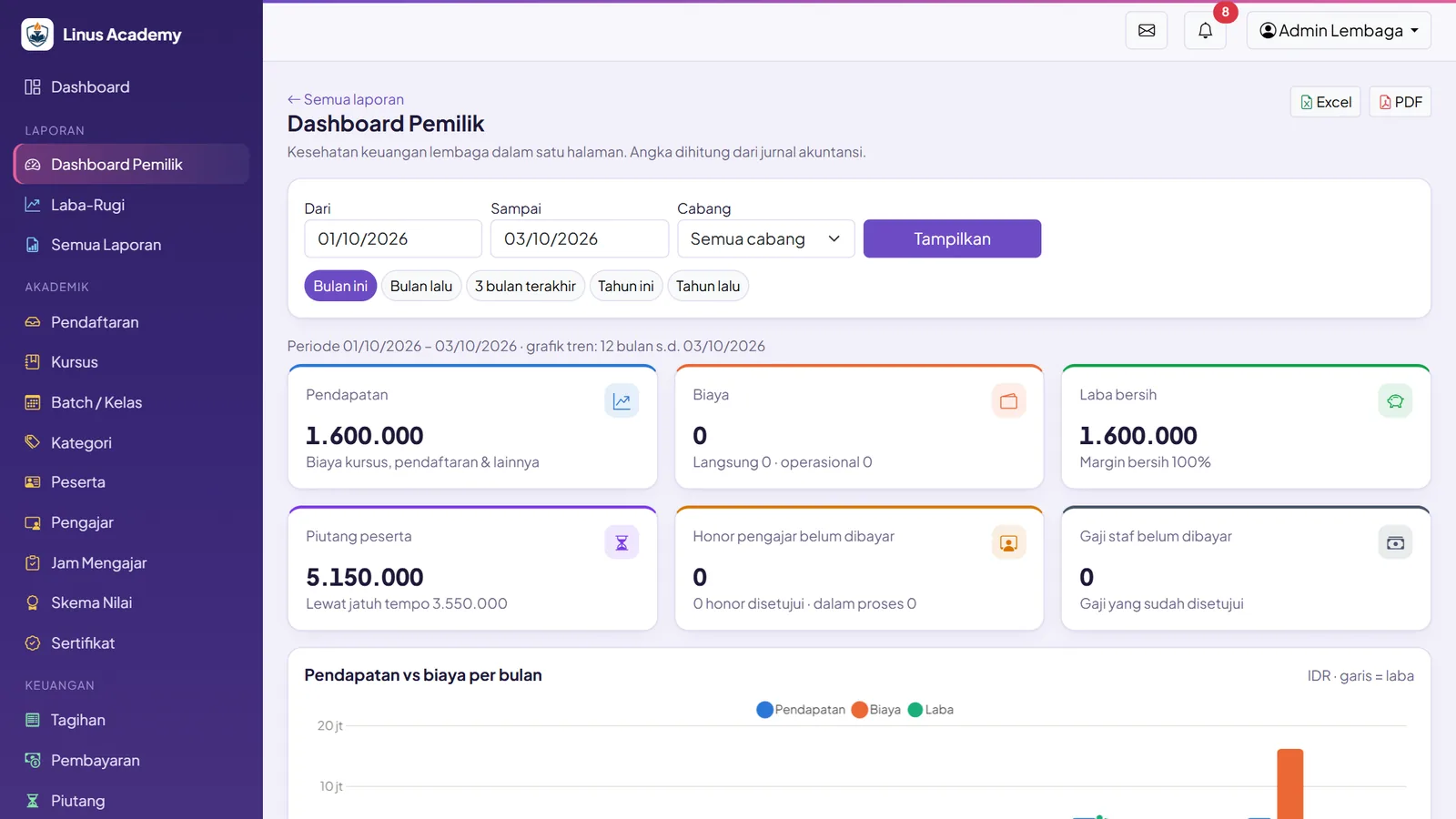
- ✓Owner dashboard with 12-month trends
- ✓Profit and loss per branch, course, batch, and cost center
- ✓Batch profitability with overhead allocation
- ✓Cash and bank flow, invoice and payment registers, and academic summaries
- ✓Course performance: popularity, completion and dropout rates, and student satisfaction
- ✓Fee and teaching hour reports, staff payroll, trial balance, and general ledger
- ✓Every report can be exported to Excel and PDF
Indonesian Formats
- ✓Dates as dd/mm/yyyy and Rupiah with dot separators (Rp1.500.000)
- ✓Amounts written in words (terbilang) on receipts
- ✓NIK validation for student data
- ✓WhatsApp numbers normalized to the 62 format automatically
This is what Elang Course Management looks like
Every image below was taken directly from the app with demo data. None are mockups.
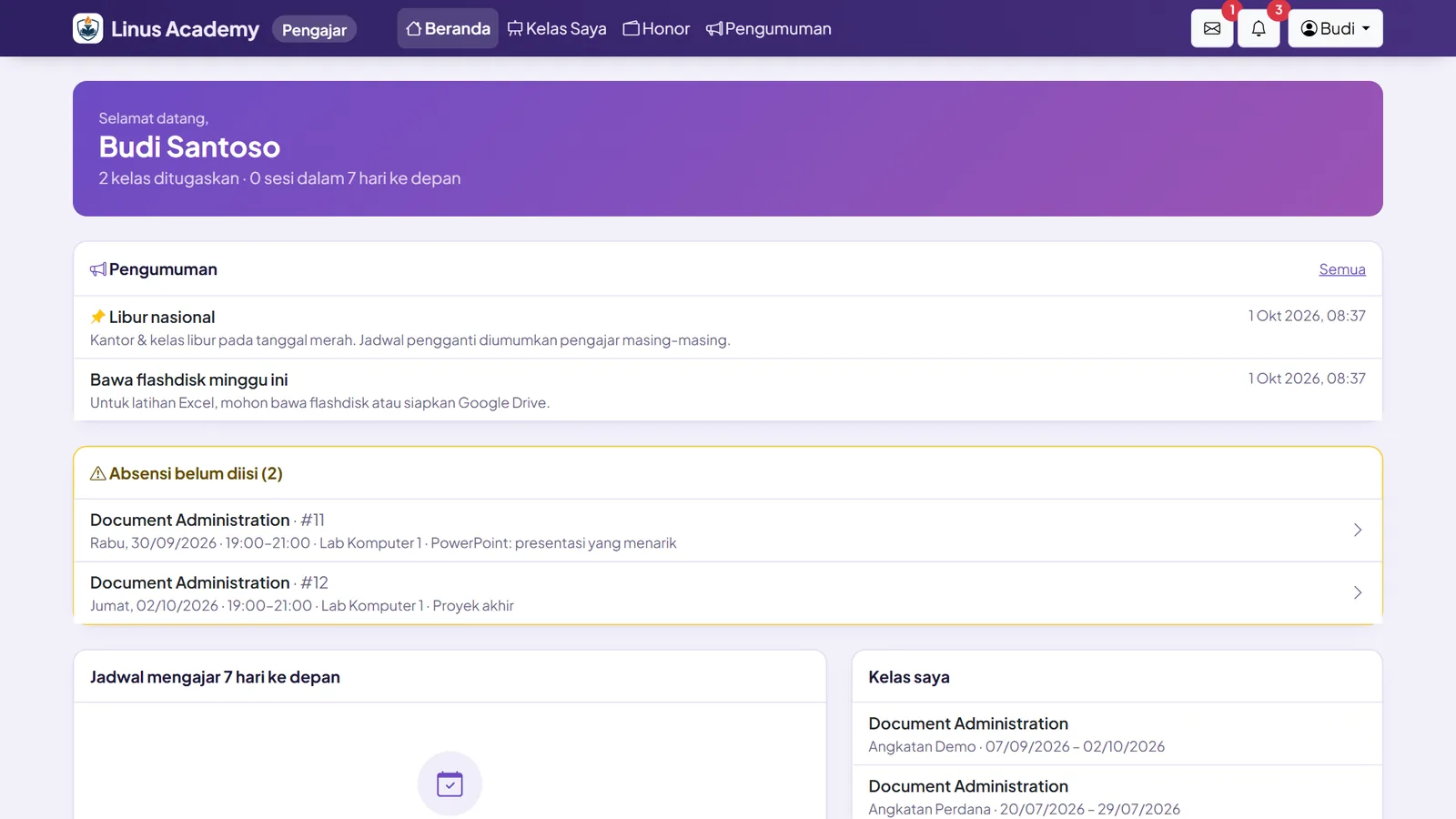
Students and instructors handle their own needs
One login page for three portals: the Back Office for staff, the Instructor Portal, and the Student Portal. All of them work on computers, tablets, and phones through the browser.
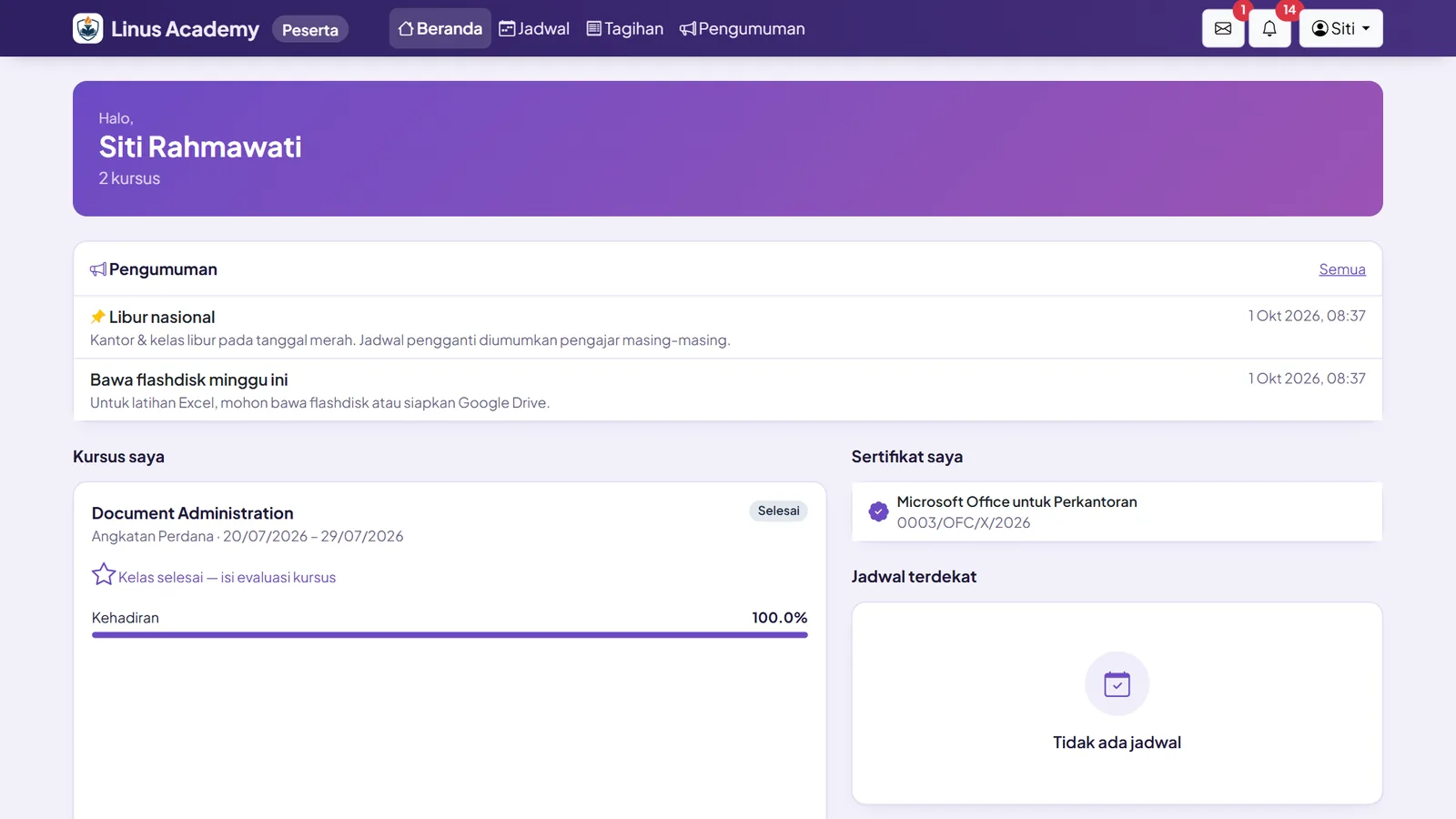
Student Portal
Students no longer need to ask over chat about schedules, invoices, or grades.
- ✓Schedule, announcements, and attendance
- ✓Materials, assignments, grades, and discussion forum
- ✓Invoices and payment proof upload
- ✓Download invoices, receipts, certificates, and transcripts
Instructor Portal
Instructors record attendance themselves, and their fees are calculated from it.
- ✓List of classes they teach
- ✓Record student attendance and teaching hours
- ✓View fee slips
- ✓Read announcements from the institution
Connected to email, WhatsApp, and typing practice
Notifications are sent through your institution’s own email (SMTP), for example enrollment updates and invoice information.
WhatsApp notifications can be connected to the WhatsApp gateway of your choice (via webhook). Your institution’s website also includes a WhatsApp contact button.
Elang Typing Instructor
A “Typing Practice” button in the student portal. Practice results are summarized and can be added straight to grades. A good fit for computer and typing courses. Typing Instructor is a free app from Laksana Elang.
Try Elang Typing Instructor →Every number and every change leaves a clear trail
Student payments, grades, and certificates are a matter of trust for your institution. That is why access is limited by role, changes are recorded, and important transactions go through approval.
Role-based access
Around 70 permissions and 7 built-in roles: Institution Admin, Branch Admin, Academics, Finance, HR & Payroll, Instructor, and Student. You can also create your own roles, and roles can be limited per branch.
Change history (audit log)
Every important change is recorded automatically, with the old and new values. NIK numbers are masked in those records.
Layered approvals
Enrollment, instructor attendance, expenses, payroll, fees, and monthly closing all go through approval. Whoever creates an expense cannot approve it.
Protected login and backups
Passwords are stored with Argon2id, login attempts are rate-limited, and data backup and restore are available.
Fully managed on your own server
We set up and maintain the server, security, updates, and backups. The monthly fee is fixed, not charged per user or per student.
Your data, exportable
Student, finance, and academic data stays with your institution. Every report can be exported to Excel and PDF at any time.
Common questions
What kind of institution is it for?+
Course centers, training providers, tutoring centers (bimbel), and private lessons, whether you have one location or many branches. Each branch can have its own contact page, and staff access can be limited per branch. If needed, one installation can also serve several institutions.
Can it accept QRIS or payment gateway payments?+
Currently, Elang Course Management records the payment method a student uses (cash, bank transfer, QRIS, VA, or card), and students can upload payment proof for staff to verify. Payments are not yet processed automatically through a payment gateway. If your institution needs it, a payment gateway integration can be discussed as a development project.
Can students pay in installments or with a deposit?+
Yes. Invoices can be paid in full, in installments, or with a deposit at a minimum percentage you set. Overpayments automatically become student credit, and receivables aging is shown by day bracket (current, 1–30, 31–60, 61–90, >90 days).
How can others check that a certificate is genuine?+
Every PDF certificate has an automatic number and a QR code. When the QR is scanned, or the number is checked on the public /verifikasi (verification) page, it shows VALID, REVOKED, or EXPIRED. Companies hiring your graduates can check it themselves.
How are instructor fees calculated?+
Fees are calculated from approved teaching attendance, with 5 fee schemes and special rates per batch. The flow: Calculated, Verified by academics, Approved by finance, then Paid. Instructors can view their fee slips in the Instructor Portal.
Do students and instructors need to install an app?+
No. All portals run in the browser and work on computers, tablets, and phones. Students, instructors, and staff sign in through the same login page. There is currently no app version to download from the Play Store or App Store.
Can it send notifications over WhatsApp?+
Yes. Notifications are sent by email (SMTP), and for WhatsApp the system can be connected to the WhatsApp gateway of your choice via webhook. There is also a message inbox, per-class broadcasts, and announcements inside the portals.
How are the server and data managed?+
Elang Course Management runs on your own server (VPS), and we set it up and manage it fully: server, security, updates, and backups. The monthly fee is fixed (server rental + maintenance), not charged per user or per student. Your institution’s data stays yours and can be exported at any time.
See the whole flow, from enrollment to certificate
Book a free demo. We’ll show you how applicants are approved, invoices are issued, instructor fees are calculated, and QR certificates are issued.