
From the Attendance Machine to the Payslip Without Retyping
A face-attendance machine only stores tap times. What decides pay is everything that happens afterwards. Here is the full chain, from the face at the door to the journal in your ledger.
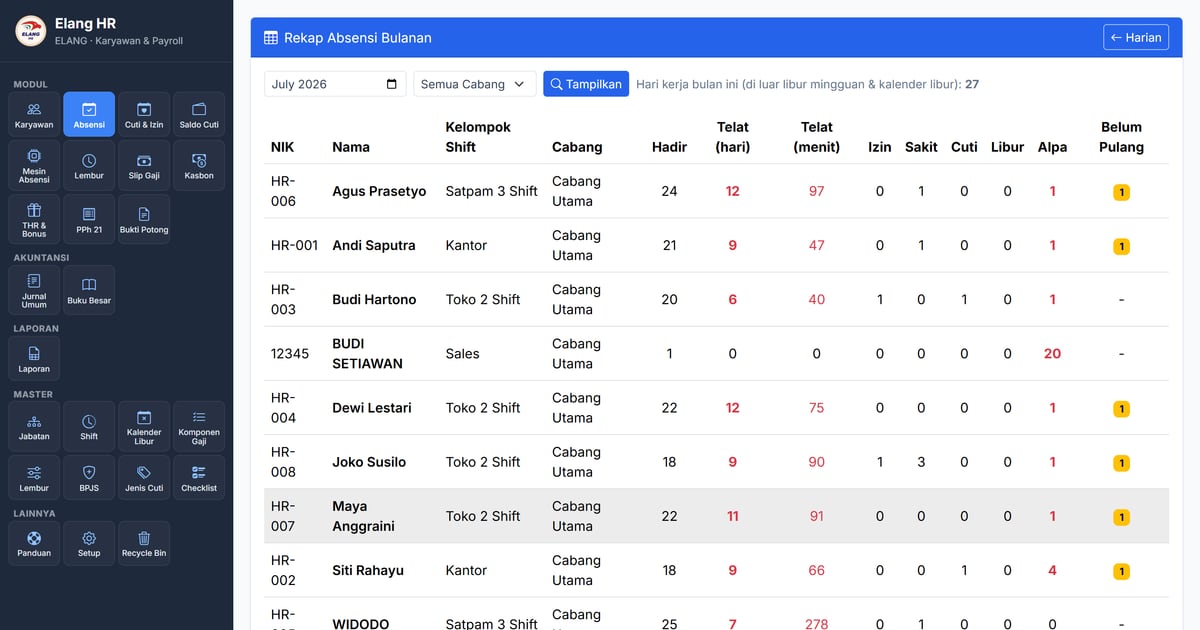
Plenty of companies buy a face-attendance machine expecting attendance to be a solved problem. A few months later the situation looks like this: the machine works perfectly, yet at the start of every month somebody still downloads a file from it, opens it in a spreadsheet, matches arrival times to shift schedules by hand, marks who was late, and types the result into the payroll calculation.
The machine isn’t at fault. What’s missing is the chain after the tap.
This article walks that chain — five stages from a face at the door to a number in the ledger — and points out where it usually breaks.
Stage 1 — Taps reach the server instead of waiting to be downloaded
Modern attendance machines work in one of two ways. The old way: data sits on the device and is downloaded periodically by staff. The better way: the machine pushes each tap to the server as it happens.
The difference isn’t just convenience. With live delivery, a supervisor can see who has arrived at nine in the morning — not on the 3rd of next month. And the data survives if the device is damaged or stolen.
Two safeguards still need to exist: a pull of stored taps to recover anything recorded while the server was down, and a clock sync, so the device’s time doesn’t drift from the server’s — a few minutes of drift is enough to mark someone late who wasn’t.
Stage 2 — Faces enrolled from employee records, not from a queue
This is the most underrated part, and the most painful once a company has several branches.
The usual approach: every new hire stands in front of the machine to have their face enrolled. With five branches and staff who move between them, one person needs enrolling five times. Someone leaves? They must be removed five times too — and one is almost always missed, which means a former employee can still open a door.
The healthier approach: the profile photo in the employee record enrols the face, and every addition, change, or deactivation syncs automatically to every connected machine. A device that is switched off receives the update as soon as it comes back. One place to manage, all machines follow.
That does make photo quality matter. The face must be clearly visible and well lit — and if the machine rejects a photo, the reason needs to be shown so HR knows to replace it.
Stage 3 — Taps translated into attendance
This is where the chain most often breaks, because this stage requires knowledge of the schedule, not just storage.
A tap row reads “HR-005, 22:04”. To become an attendance record, the system has to know:
- which shift group this employee belongs to, and which shift applies that day;
- whether the shift crosses midnight — a guard starting at 24:00 and leaving at 07:00 worked one working day, not two;
- the company’s lateness tolerance, and how many minutes late they actually were;
- how long a clock-out tap remains valid, so someone who forgot to tap isn’t counted as still at work;
- whether the day is a holiday — weekly rest day or public holiday — so absence isn’t counted as truancy.
That last one gets skipped often and costs dearly: an unfilled holiday calendar makes the entire workforce look absent on a national holiday. A correct monthly recap must separate present, late, permitted, sick, leave, holiday and unexcused absence — plus a “no clock-out” flag that can be chased the same day.
Stage 4 — The recap becomes money
A tidy recap only pays off when payroll consumes it directly. Several things should flow on their own:
- daily allowances such as meal and transport multiplied by days present;
- late fines and absence deductions following your policy figures;
- paid leave still counted as a paid day — otherwise an employee on approved leave loses their meal allowance;
- approved overtime landing as an allowance in the same month;
- proration for staff joining or leaving mid-month.
If any one of these is still computed by hand, the benefit of the face machine is erased inside a single spreadsheet cell.
Stage 5 — The payslip becomes a journal
The end of the chain, and the part most often forgotten while choosing a system. Once payslips are final, the numbers still have to reach the books: payroll expense, income-tax payable, BPJS expense and payable.
If HR is separate from accounting, all you get is an export file that someone still imports or retypes. If both live in one system, posting a payslip creates a draft journal in the ledger immediately, and accounting simply reviews and posts it. The chain is complete: one face tap, entered once, all the way to the balance sheet.
What about field staff?
A face machine can’t reach sales reps, couriers, or technicians who rarely visit the office. For them the two common routes are phone-based attendance with GPS and a selfie, or manual entry by a supervisor with a clear correction trail.
We’ll say this plainly: in Elang Human Resource, phone-based attendance is not available yet and sits in the development queue. What does exist is traceable manual correction — HR can record attendance for field staff, and the system logs who made the correction. For companies whose staff mostly work at fixed locations — retail, restaurants, factories, offices — the face-machine chain already handles the bulk of the problem.
Elang Human Resource
Elang Human Resource is built along those five stages: taps arrive from the face machine in real time and are matched to the shift schedule, face enrolment uses the employee’s profile photo and syncs to every machine, the monthly recap separates seven attendance states, and payslips compute daily allowances, fines, overtime, proration, BPJS and income tax — then post their journal into the ledger of the same application.
We set it up and maintain it on your own server (VPS) for a fixed monthly fee (server rental + maintenance), and all raw tap data stays on that server — not with a third-party service.
Closing
An attendance machine answers “what time did they arrive”. What determines pay is the next question: “so how much is owed, and how is it recorded.” As long as the second answer is retyped by a human, no machine, however advanced, removes the work — it only moves it.
Read next: what HR & payroll software for Indonesia must cover, how face-recognition machines work, and the employee portal for leave & overtime. Or go straight to Elang Human Resource and request a free demo.