
Get Leave Requests Out of the WhatsApp Group: Why You Need an Employee Portal
Leave, overtime and loan requests piled up in chat turn HR into a re-typist. Here is how an employee self-service portal works and what actually changes once it is running.
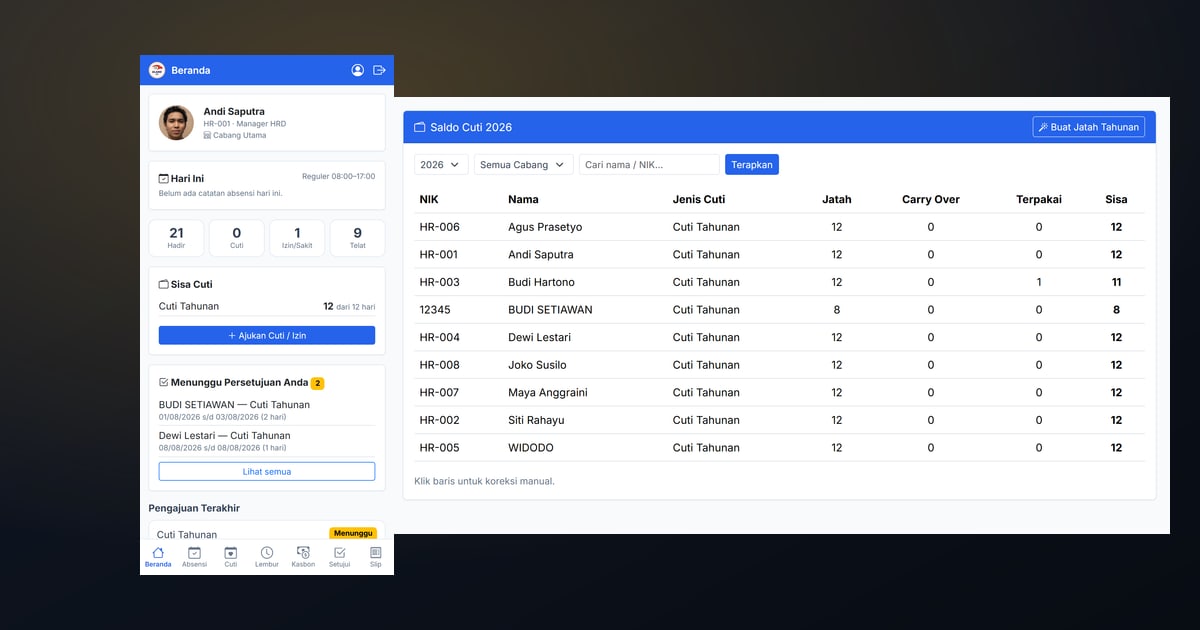
Take a look at the HR officer’s phone in your office. Odds are it contains a request for two days off, a photo of a doctor’s note, a “how many leave days do I have left?”, a Saturday overtime request sent late on Friday, and someone asking about last month’s payslip — all mixed across a few group chats and private messages.
Every one of those is a legitimate HR transaction, stored somewhere that cannot be totalled, cannot be searched, and disappears when the phone is replaced. The result is always the same: HR copies it all back into a spreadsheet.
An employee portal — commonly called Employee Self Service, or ESS — exists to close that gap.
What an employee portal actually solves
ESS is not merely “the HR app, employee edition”. It moves the point where data enters the system from HR to the person the data belongs to.
Compare two paths for a single leave request.
Without a portal: the employee messages their supervisor → the supervisor replies “ok” → the employee forwards it to HR → HR checks the leave balance in a spreadsheet → HR deducts the balance → HR notes the dates in the attendance file → at month end HR remembers (or forgets) that this leave is paid and must not cost the employee their meal allowance.
With a portal: the employee picks dates on their phone; the system counts the days itself, skipping holidays, and refuses the request if the balance is short or it collides with another one; the supervisor taps Approve on their own phone; the balance drops, attendance is recorded, and that month’s payslip follows automatically.
Six manual steps become two taps. More importantly: not a single number is copied by a human.
What employees should be able to do themselves
A useful portal gives staff, at minimum:
- their own monthly attendance — this quietly ends a lot of month-end arguments, because employees can see for themselves which days were logged as late;
- an always-current leave balance, with nobody to ask;
- leave requests and their status: pending, approved, or rejected with the reason;
- overtime requests, and once approved, the amount they will actually receive;
- staff loan requests and the instalments still outstanding;
- finalised payslips to download themselves, plus the annual tax withholding slip;
- approvals for anyone acting as a supervisor — straight from their phone, no office computer required.
Notice that this list removes three HR jobs at once: answering questions, retyping, and handing out payslips one by one.
No installed app required
Plenty of companies abandon ESS because they picture every employee downloading an app, creating an account, and updating it whenever a new version ships — a lot to ask of someone whose phone storage is already full.
A web portal designed for phone screens is more than enough: opened from a link, pinnable to the home screen, and always the current version with no update step. For leave, overtime and payslips, a native app doesn’t buy enough to justify the friction.
On logins: don’t force staff to become system users
This is a technical decision with a very real effect on data hygiene. If ESS uses the same user list as your core business system, then every employee — including those who never touch a computer — becomes a system account that must be managed, assigned a role, and removed on exit.
The cleaner approach: portal identity stands on its own, using an employee number plus a PIN issued once by HR and changed by the employee on first login. Forgotten PIN? Issue a new one. Simple for staff, and the core system’s user list stays lean.
One approval level solves 90% of it
HRIS vendors love multi-level approval chains: direct supervisor → department manager → HR → director. It sounds thorough, but in a company of dozens to a few hundred staff, a long chain is mostly a place for requests to get stuck.
For most companies one level is enough: the direct supervisor, or HR when an employee has none. What matters isn’t chain length but that every decision leaves a trace — who approved, when, and if rejected, why.
What changes once it’s running
Three things are usually noticeable within the first month:
- Repeat questions stop. “How much leave do I have left” and “where’s my payslip” are the two most common messages HR receives, and both vanish once the answer lives on the employee’s phone.
- Requests stop disappearing. Something filed as a request cannot be “not read yet”. Both sides can see its status.
- Payroll closes faster. Because leave, overtime and loans entered the system throughout the month, there are no longer days spent collecting evidence at the end of it.
What the company has to prepare
Employee portals fail for organisational reasons, not technical ones. Before switching it on:
- assign each employee a supervisor — without this every request piles up on HR and nothing improves;
- tidy up leave types and annual quotas first, so the numbers staff see are right from day one;
- announce the rule: from a given date, requests sent by chat are not processed. Without a firm cutoff, both channels run in parallel and HR works twice;
- hand out PINs privately, not in a group chat.
Elang Human Resource
The employee portal in Elang Human Resource works exactly that way: mobile-first with nothing to install, login by employee number and a PIN that must be changed on first use, covering attendance, leave balance, leave/overtime/loan requests, finalised payslips, and the annual tax slip. Supervisors approve from their phone, and the moment they do, the numbers flow into that month’s attendance recap and payslip — and eventually into the journal in your books.
We set it up and maintain it on your own server (VPS) for a fixed monthly fee — how many employees use the portal does not change the invoice.
Closing
A WhatsApp group is a good communication tool and a bad system of record. As long as leave and overtime requests live there, HR remains a manual bridge between conversation and spreadsheet — and every manual bridge is somewhere numbers can fall through.
Read next: what HR & payroll software for Indonesia must cover and from the attendance machine to the payslip without retyping. Or go straight to Elang Human Resource and request a free demo.